https://fedoraproject.org/wiki/Changes/IBus_1.5.29
This document represents a proposed Change. As part of the Changes
process, proposals are publicly announced in order to receive
community feedback. This proposal will only be implemented if approved
by the Fedora Engineering Steering Committee.
== Summary ==
IBus 1.5.29 will work with Plasma Wayland more closely using the
Wayland protocol.
== Owner ==
* Name: [[User:Fujiwara|Takao Fujiwara]]
* Email: fujiwara [at] redhat [dot] com
== Detailed Description ==
* IBus will be able to switch the keyboard layouts with the panel icon
menu in Plasma Wayland.
* IBus will be able to show the candidate popup window near the input
cursor in Plasma Wayland.
* IBus will be able to switch the keyboard layouts with the shortcut
key in Plasma Wayland.
== Feedback ==
== Benefit to Fedora ==
IBus will use Wayland input-method protocol in Plasma Wayland and
handle the key events and switch keyboard layouts and the position the
candidate popup window.
== Scope ==
* Proposal owners: ibus 1.5.29
* Other developers: [[AkiraTagoh| Akira TAGOH]]
* Release engineering: [https://pagure.io/releng/issues #Releng issue number]
* Policies and guidelines: N/A
* Trademark approval: N/A (not needed for this Change)
* Alignment with Community Initiatives:
== Upgrade/compatibility impact ==
You need to unset QT_IM_MODULE and GTK_IM_MODULE environment variables
in Plasma Wayland desktop only but not Plasma Xorg desktop and follow
the Setup section below.
== How To Test ==
=== Setup ===
# Install Plasma Wayland desktop and Log into the desktop session.
# Run konsole and type `env` and if you find `QT_IM_MODULE=ibus` or
`GTK_IM_MODULE=ibus`, you need to run im-chooser and select "No Input
Method" and make sure `QT_IM_MODULE` and `GTK_IM_MODULE` environment
variables are not set on konsole.
# Run systemsettings5 and open "Input Devices" -> "Virtual Keyboard"
and select "IBus Wayland" and press "Apply" button.
# Focus on the konsole input context and IBus panel icon will be shown.
=== Panel Menu ===
# Run kwrite and open a new document.
# Focus on the input context in kwrite and click IBus panel icon to
show the panel menu.(May need to click kwrite again to open the menu)
# Select a keyboad layout on the panel menu and IBus can switch the
keyboard layouts.
=== Input Method List with Shortcut Key ===
# Run kwrite and open a new document.
# Focus on the input context in kwrite and type Super-space to show
the input method engine popup window.(May need to click kwrite again
to open the popup)
# Select a keyboad layout on the popup window with some space keys
pressing Super key and IBus can switch the keyboard layouts.
== User Experience ==
IBus had not supported to switch the keyboard layouts since Plasma
Wayland has been integrated in Fedora but now IBus can switch both the
keyboard layouts and input method engines and IBus candidate window is
now shown near the input cursor and those are useful for the users.
== Dependencies ==
Other IBus packages and KDE packages don't need to be rebuilt.
We use systemsettings5 to enable IBus in Plasma wayland as the first
implementation. The configuration with imsettings is nice to have in
Fedora 39 GA but will be implemented later.
== Contingency Plan ==
* Contingency mechanism: Revert the change to ibus.
* Contingency deadline: Beta release
* Blocks release? No
== Documentation ==
TBD
== Release Notes ==
--
Aoife Moloney
Product Owner
Community Platform Engineering Team
Red Hat EMEA
Communications House
Cork Road
Waterford
_______________________________________________
devel-announce mailing list -- devel-announce@lists.fedoraproject.org
To unsubscribe send an email to devel-announce-leave@lists.fedoraproject.org
Fedora Code of Conduct: https://docs.fedoraproject.org/en-US/project/code-of-conduct/
List Guidelines: https://fedoraproject.org/wiki/Mailing_list_guidelines
List Archives: https://lists.fedoraproject.org/archives/list/devel-announce@lists.fedoraproject.org
Do not reply to spam, report it: https://pagure.io/fedora-infrastructure/new_issue


Wednesday, July 5, 2023

F39 Change Proposal: Migrate NetworkManager ifcfg profiles to keyfile (System Wide)
https://fedoraproject.org/wiki/Changes/MigrateIfcfgToKeyfile
This document represents a proposed Change. As part of the Changes
process, proposals are publicly announced in order to receive
community feedback. This proposal will only be implemented if approved
by the Fedora Engineering Steering Committee.
== Summary ==
Migrate NetworkManager network connection profiles stored in ifcfg
format to the keyfile format.
== Owner ==
* Name: [[User:bengal| Beniamino Galvani]], [[User:ffmancera| Fernando
Fernández Mancera]], [[User:Till| Till Maas]]
* Email: <bgalvani@redhat.com>, <ferferna@redhat.com>, <till@fedoraproject.org>
== Detailed Description ==
NetworkManager supports different formats to persist connection
profiles to disk. On Fedora the two formats used are ''keyfile'' and
''ifcfg''. The former stores connections in
`{/etc,/usr/lib,/run}/NetworkManager/system-connections` in a format
similar to INI files. Connections in ifcfg format are compatible with
the legacy network scripts and are saved in
`/etc/sysconfig/network-scripts` as a collection of shell variables.
Not all connection types are supported by ifcfg, and NetworkManager
always uses the keyfile format for unsupported types.
Since [https://fedoraproject.org/wiki/Changes/NetworkManager_keyfile_instead_of_ifcfg_rh
Fedora Linux 33], NetworkManager writes profiles by default in the
keyfile format. Also, since
[https://fedoraproject.org/wiki/Changes/NoIfcfgFiles Fedora Linux 36]
the plugin to persist ifcfg files is included in a separate package
(`NetworkManager-initscripts-ifcfg-rh`) and is not shipped in new
installations.
The upstream NetworkManager project has recently declared the ifcfg
plugin as [https://lists.freedesktop.org/archives/networkmanager/2023-May/000103.html
deprecated]. This means that the code will only receive bug fixes,
and will not get new functionality such as supporting new properties.
With this change, existing profiles in ifcfg format will be
automatically migrated to the native keyfile format via a migration
service shipped with the `NetworkManager-initscripts-ifcfg-rh`
package. In Fedora, we plan to drop the plugin by Fedora Linux 41.
== Benefit to Fedora ==
Until recently, both keyfile and ifcfg supported the same set of
properties. With the ifcfg deprecation, new properties are only
implemented for the keyfile plugin and not for ifcfg. When users try
to set an unsupported property on a ifcfg profile, they get an error:
$ nmcli connection modify ethernet-enp1s0 link.tx-queue-length 1234
Error: Failed to modify connection 'ethernet-enp1s0': failed to
update connection: The ifcfg-rh plugin doesn't support setting 'link'.
If you are modifying an existing connection profile saved in ifcfg-rh
format, please migrate the connection to keyfile using 'nmcli
connection migrate c3f6f067-e1d5-4bb1-8d67-e09109253a79' or via the
Update2() D-Bus API and try again.
At the moment there are only 4 unsupported properties but the list is
going to increase with time. Furthermore, ifcfg support will be
dropped in future versions of NetworkManager.
The benefit of this change is that users having ifcfg files will be
migrated to the more modern and future-proof format supporting all the
functionalities offered by NetworkManager.
== Scope ==
* Proposal owners: introduce a migration service and ship it with the
`NetworkManager-initscripts-ifcfg-rh` package
* Other developers: N/A
* Release engineering: N/A
* Policies and guidelines: N/A
* Trademark approval: N/A
== Upgrade/compatibility impact ==
The majority of users will not be impacted by the change. Only users
that meet all the following criteria will be affected:
* the user is upgrading from a previous Fedora version
* the user has the the NetworkManager-initscripts-ifcfg-rh package installed
* the user has at least one connection profile stored in ifcfg format
Since keyfile was made the default in Fedora 33, and ifcfg was dropped
from new installations in Fedora 36, the only scenarios in which users
meet those criteria are:
* the user originally installed Fedora 32 or a previous version
* the user installed Fedora 33 or later, then manually switched the
default plugin to "ifcfg-rh" in the configuration and then added new
connections
* the user installed Fedora 36 or later, explicitly installed the
NetworkManager-initscripts-ifcfg-rh package, manually switched the
default plugin to "ifcfg-rh" in the configuration and then added new
connections
== How To Test ==
* Install the NetworkManager-initscripts-ifcfg-rh package
* Restart NetworkManager
* Migrate a connection to ifcfg-rh via nmcli: `nmcli connection
migrate --plugin ifcfg-rh $NAME`
* Check that the migration had effect with `nmcli -f name,filename
connection`: the profile should now be stored in
`/etc/sysconfig/network-scripts`
* Upgrade to Fedora 39
* Check that all profiles are now stored in
`/etc/NetworkManager/system-connections` in keyfile format.
== User Experience ==
For users that are affected by the migration, there should not be any
observable change in behavior. The keyfile format supports a superset
of the features supported by ifcfg. Furthermore, the migration is done
by the NetworkManager daemon using the same code path used to store
new connections in keyfile format. Any bug in the migration would also
affect the creation of new connections.
If users have custom scripts or tools that parse the ifcfg files,
those will break and need to be adjusted. One notable example of such
tools is in package `initscripts-rename-device`, which provides a udev
helper to rename interfaces based on the MAC and interface name found
in ifcfg files. Users relying on this mechanism will need to switch to
systemd .link files (or udev rules) to perform the renaming.
The release notes for the Fedora version shipping this change will
mention these aspects.
== Dependencies ==
N/A
== Contingency Plan ==
* Contingency mechanism: Revert the change, try again the next Fedora release.
* Contingency deadline: Beta freeze
* Blocks release? no
== Documentation ==
No doc change required.
== Release Notes ==
The change will be mentioned in the Release Notes.
--
Aoife Moloney
Product Owner
Community Platform Engineering Team
Red Hat EMEA
Communications House
Cork Road
Waterford
_______________________________________________
devel-announce mailing list -- devel-announce@lists.fedoraproject.org
To unsubscribe send an email to devel-announce-leave@lists.fedoraproject.org
Fedora Code of Conduct: https://docs.fedoraproject.org/en-US/project/code-of-conduct/
List Guidelines: https://fedoraproject.org/wiki/Mailing_list_guidelines
List Archives: https://lists.fedoraproject.org/archives/list/devel-announce@lists.fedoraproject.org
Do not reply to spam, report it: https://pagure.io/fedora-infrastructure/new_issue
This document represents a proposed Change. As part of the Changes
process, proposals are publicly announced in order to receive
community feedback. This proposal will only be implemented if approved
by the Fedora Engineering Steering Committee.
== Summary ==
Migrate NetworkManager network connection profiles stored in ifcfg
format to the keyfile format.
== Owner ==
* Name: [[User:bengal| Beniamino Galvani]], [[User:ffmancera| Fernando
Fernández Mancera]], [[User:Till| Till Maas]]
* Email: <bgalvani@redhat.com>, <ferferna@redhat.com>, <till@fedoraproject.org>
== Detailed Description ==
NetworkManager supports different formats to persist connection
profiles to disk. On Fedora the two formats used are ''keyfile'' and
''ifcfg''. The former stores connections in
`{/etc,/usr/lib,/run}/NetworkManager/system-connections` in a format
similar to INI files. Connections in ifcfg format are compatible with
the legacy network scripts and are saved in
`/etc/sysconfig/network-scripts` as a collection of shell variables.
Not all connection types are supported by ifcfg, and NetworkManager
always uses the keyfile format for unsupported types.
Since [https://fedoraproject.org/wiki/Changes/NetworkManager_keyfile_instead_of_ifcfg_rh
Fedora Linux 33], NetworkManager writes profiles by default in the
keyfile format. Also, since
[https://fedoraproject.org/wiki/Changes/NoIfcfgFiles Fedora Linux 36]
the plugin to persist ifcfg files is included in a separate package
(`NetworkManager-initscripts-ifcfg-rh`) and is not shipped in new
installations.
The upstream NetworkManager project has recently declared the ifcfg
plugin as [https://lists.freedesktop.org/archives/networkmanager/2023-May/000103.html
deprecated]. This means that the code will only receive bug fixes,
and will not get new functionality such as supporting new properties.
With this change, existing profiles in ifcfg format will be
automatically migrated to the native keyfile format via a migration
service shipped with the `NetworkManager-initscripts-ifcfg-rh`
package. In Fedora, we plan to drop the plugin by Fedora Linux 41.
== Benefit to Fedora ==
Until recently, both keyfile and ifcfg supported the same set of
properties. With the ifcfg deprecation, new properties are only
implemented for the keyfile plugin and not for ifcfg. When users try
to set an unsupported property on a ifcfg profile, they get an error:
$ nmcli connection modify ethernet-enp1s0 link.tx-queue-length 1234
Error: Failed to modify connection 'ethernet-enp1s0': failed to
update connection: The ifcfg-rh plugin doesn't support setting 'link'.
If you are modifying an existing connection profile saved in ifcfg-rh
format, please migrate the connection to keyfile using 'nmcli
connection migrate c3f6f067-e1d5-4bb1-8d67-e09109253a79' or via the
Update2() D-Bus API and try again.
At the moment there are only 4 unsupported properties but the list is
going to increase with time. Furthermore, ifcfg support will be
dropped in future versions of NetworkManager.
The benefit of this change is that users having ifcfg files will be
migrated to the more modern and future-proof format supporting all the
functionalities offered by NetworkManager.
== Scope ==
* Proposal owners: introduce a migration service and ship it with the
`NetworkManager-initscripts-ifcfg-rh` package
* Other developers: N/A
* Release engineering: N/A
* Policies and guidelines: N/A
* Trademark approval: N/A
== Upgrade/compatibility impact ==
The majority of users will not be impacted by the change. Only users
that meet all the following criteria will be affected:
* the user is upgrading from a previous Fedora version
* the user has the the NetworkManager-initscripts-ifcfg-rh package installed
* the user has at least one connection profile stored in ifcfg format
Since keyfile was made the default in Fedora 33, and ifcfg was dropped
from new installations in Fedora 36, the only scenarios in which users
meet those criteria are:
* the user originally installed Fedora 32 or a previous version
* the user installed Fedora 33 or later, then manually switched the
default plugin to "ifcfg-rh" in the configuration and then added new
connections
* the user installed Fedora 36 or later, explicitly installed the
NetworkManager-initscripts-ifcfg-rh package, manually switched the
default plugin to "ifcfg-rh" in the configuration and then added new
connections
== How To Test ==
* Install the NetworkManager-initscripts-ifcfg-rh package
* Restart NetworkManager
* Migrate a connection to ifcfg-rh via nmcli: `nmcli connection
migrate --plugin ifcfg-rh $NAME`
* Check that the migration had effect with `nmcli -f name,filename
connection`: the profile should now be stored in
`/etc/sysconfig/network-scripts`
* Upgrade to Fedora 39
* Check that all profiles are now stored in
`/etc/NetworkManager/system-connections` in keyfile format.
== User Experience ==
For users that are affected by the migration, there should not be any
observable change in behavior. The keyfile format supports a superset
of the features supported by ifcfg. Furthermore, the migration is done
by the NetworkManager daemon using the same code path used to store
new connections in keyfile format. Any bug in the migration would also
affect the creation of new connections.
If users have custom scripts or tools that parse the ifcfg files,
those will break and need to be adjusted. One notable example of such
tools is in package `initscripts-rename-device`, which provides a udev
helper to rename interfaces based on the MAC and interface name found
in ifcfg files. Users relying on this mechanism will need to switch to
systemd .link files (or udev rules) to perform the renaming.
The release notes for the Fedora version shipping this change will
mention these aspects.
== Dependencies ==
N/A
== Contingency Plan ==
* Contingency mechanism: Revert the change, try again the next Fedora release.
* Contingency deadline: Beta freeze
* Blocks release? no
== Documentation ==
No doc change required.
== Release Notes ==
The change will be mentioned in the Release Notes.
--
Aoife Moloney
Product Owner
Community Platform Engineering Team
Red Hat EMEA
Communications House
Cork Road
Waterford
_______________________________________________
devel-announce mailing list -- devel-announce@lists.fedoraproject.org
To unsubscribe send an email to devel-announce-leave@lists.fedoraproject.org
Fedora Code of Conduct: https://docs.fedoraproject.org/en-US/project/code-of-conduct/
List Guidelines: https://fedoraproject.org/wiki/Mailing_list_guidelines
List Archives: https://lists.fedoraproject.org/archives/list/devel-announce@lists.fedoraproject.org
Do not reply to spam, report it: https://pagure.io/fedora-infrastructure/new_issue
F39 Change Proposal: Enable auto-updates by default in Fedora Kinoite (Self-Contained)
https://fedoraproject.org/wiki/Changes/KDEKinoiteAutoUpdateByDefault
This document represents a proposed Change. As part of the Changes
process, proposals are publicly announced in order to receive
community feedback. This proposal will only be implemented if approved
by the Fedora Engineering Steering Committee.
== Summary ==
On Fedora Kinoite, Plasma Discover supports automatically updating the
system in a safe fashion via rpm-ostree staged updates. We want users
to benefit from bug fixes and updates in general by default thus we
want to enable auto-updates by default. Users will still have the
option of disabling that or tuning the frequency at which updates
happen.
== Owner ==
* Name: [[User:Siosm|Timothée Ravier]], [[User:Ngompa|Neal Gompa]]
* Email: <siosm@fedoraproject.org>, <ngompa@fedoraproject.org>
== Detailed Description ==
We will enable a setting named "Unattended Updates" in Plasma Discover
that will enable background updates by default in new installations
and existing installations. This process uses rpm-ostree staged
updates support to download and prepare the new version of the system
in the background, which is then used on reboot.
The user will only be notified to reboot their system once the updates
have been applied and once a given amount of time has passed before
the last time an update was applied.
Pull request for the change:
https://pagure.io/workstation-ostree-config/pull-request/393
Bugs related to the change (that the change owner will fix):
* https://bugs.kde.org/show_bug.cgi?id=471548
* https://bugs.kde.org/show_bug.cgi?id=454422
== Feedback ==
None so far.
== Benefit to Fedora ==
Users benefit from updates quickly and by default. Users don't have to
worry about updating their system anymore.
== Scope ==
* Proposal owners: Implement and test the change
(https://pagure.io/workstation-ostree-config/pull-request/393)
* Other developers: N/A
* Release engineering: N/A
* Policies and guidelines: N/A (not needed for this Change)
* Trademark approval: N/A (not needed for this Change)
* Alignment with Community Initiatives: N/A
== Upgrade/compatibility impact ==
All Kinoite systems updated to Fedora 39 will have this setting set by
default if the options have not been changed manually before.
== How To Test ==
Run `echo -e "[Global]\nUseUnattendedUpdates=true\n" >
/etc/xdg/PlasmaDiscoverUpdates` as `root` and reset the Update setting
page to the defaults. The system should now download updates
automatically and asks for a reboot once a week.
== User Experience ==
User will not have to manually check for updates, they will be applied
automatically in the background. After a week without a reboot, they
will be offered to reboot to apply system updates.
== Dependencies ==
N/A
== Contingency Plan ==
* Contingency mechanism: Push the change to the next release or undo the change.
* Contingency deadline: N/A. Any time before we GA
* Blocks release? No
== Documentation ==
None needed.
== Release Notes ==
Update on Fedora Kinoite are now downloaded automatically and applied
on the next reboot.
--
Aoife Moloney
Product Owner
Community Platform Engineering Team
Red Hat EMEA
Communications House
Cork Road
Waterford
_______________________________________________
devel-announce mailing list -- devel-announce@lists.fedoraproject.org
To unsubscribe send an email to devel-announce-leave@lists.fedoraproject.org
Fedora Code of Conduct: https://docs.fedoraproject.org/en-US/project/code-of-conduct/
List Guidelines: https://fedoraproject.org/wiki/Mailing_list_guidelines
List Archives: https://lists.fedoraproject.org/archives/list/devel-announce@lists.fedoraproject.org
Do not reply to spam, report it: https://pagure.io/fedora-infrastructure/new_issue
This document represents a proposed Change. As part of the Changes
process, proposals are publicly announced in order to receive
community feedback. This proposal will only be implemented if approved
by the Fedora Engineering Steering Committee.
== Summary ==
On Fedora Kinoite, Plasma Discover supports automatically updating the
system in a safe fashion via rpm-ostree staged updates. We want users
to benefit from bug fixes and updates in general by default thus we
want to enable auto-updates by default. Users will still have the
option of disabling that or tuning the frequency at which updates
happen.
== Owner ==
* Name: [[User:Siosm|Timothée Ravier]], [[User:Ngompa|Neal Gompa]]
* Email: <siosm@fedoraproject.org>, <ngompa@fedoraproject.org>
== Detailed Description ==
We will enable a setting named "Unattended Updates" in Plasma Discover
that will enable background updates by default in new installations
and existing installations. This process uses rpm-ostree staged
updates support to download and prepare the new version of the system
in the background, which is then used on reboot.
The user will only be notified to reboot their system once the updates
have been applied and once a given amount of time has passed before
the last time an update was applied.
Pull request for the change:
https://pagure.io/workstation-ostree-config/pull-request/393
Bugs related to the change (that the change owner will fix):
* https://bugs.kde.org/show_bug.cgi?id=471548
* https://bugs.kde.org/show_bug.cgi?id=454422
== Feedback ==
None so far.
== Benefit to Fedora ==
Users benefit from updates quickly and by default. Users don't have to
worry about updating their system anymore.
== Scope ==
* Proposal owners: Implement and test the change
(https://pagure.io/workstation-ostree-config/pull-request/393)
* Other developers: N/A
* Release engineering: N/A
* Policies and guidelines: N/A (not needed for this Change)
* Trademark approval: N/A (not needed for this Change)
* Alignment with Community Initiatives: N/A
== Upgrade/compatibility impact ==
All Kinoite systems updated to Fedora 39 will have this setting set by
default if the options have not been changed manually before.
== How To Test ==
Run `echo -e "[Global]\nUseUnattendedUpdates=true\n" >
/etc/xdg/PlasmaDiscoverUpdates` as `root` and reset the Update setting
page to the defaults. The system should now download updates
automatically and asks for a reboot once a week.
== User Experience ==
User will not have to manually check for updates, they will be applied
automatically in the background. After a week without a reboot, they
will be offered to reboot to apply system updates.
== Dependencies ==
N/A
== Contingency Plan ==
* Contingency mechanism: Push the change to the next release or undo the change.
* Contingency deadline: N/A. Any time before we GA
* Blocks release? No
== Documentation ==
None needed.
== Release Notes ==
Update on Fedora Kinoite are now downloaded automatically and applied
on the next reboot.
--
Aoife Moloney
Product Owner
Community Platform Engineering Team
Red Hat EMEA
Communications House
Cork Road
Waterford
_______________________________________________
devel-announce mailing list -- devel-announce@lists.fedoraproject.org
To unsubscribe send an email to devel-announce-leave@lists.fedoraproject.org
Fedora Code of Conduct: https://docs.fedoraproject.org/en-US/project/code-of-conduct/
List Guidelines: https://fedoraproject.org/wiki/Mailing_list_guidelines
List Archives: https://lists.fedoraproject.org/archives/list/devel-announce@lists.fedoraproject.org
Do not reply to spam, report it: https://pagure.io/fedora-infrastructure/new_issue
F39 Change Proposal: GNUToolchainF39 (System-Wide)
https://fedoraproject.org/wiki/Changes/GNUToolchainF39
This document represents a proposed Change. As part of the Changes
process, proposals are publicly announced in order to receive
community feedback. This proposal will only be implemented if approved
by the Fedora Engineering Steering Committee.
== Summary ==
=== Update core components ===
Update the Fedora 39 GNU Toolchain to gcc 13.2, binutils 2.40, glibc
2.38 and gdb 13.2.
The set of core GNU Toolchain packages for Fedora 39 are as follows:
* GNU C Compiler 13.2 (Expected in August 2023)
** Associated runtimes for C++ (libstdc++), Go (gccgo), OpenMP (gomp),
Fortran (gfortran), D (phobos), Objective C/C++.
* GNU Binary Utilities 2.40 (Released February 2023)
* GNU C Library 2.38 (Expected August 2023)
* GNU Debugger 13.2 (Released May 2023)
** Note: Already available in Fedora 38.
The gcc 13.2 change will be tracked in this top-level GNU Toolchain
system-wide update. Currently Fedora Rawhide and 38 are already using
gcc 13.1, and 13.2 is expected to release in August 2023 with
additional fixes.
The binutils 2.40 change will be tracked in this top-level GNU
Toolchain system-wide update. Currently Fedora Rawhide has been
testing binutils 2.40 since Feburary 13th, 2023.
The glibc 2.38 change will be tracked in this top-level GNU Toolchain
system-wide update. Currently Fedora Rawhide has been testing glibc
2.38 since Feburary 20th 2023.
The gdb 13.2 update was rolled out across all Fedora releases and the
move to 13+ will be handled in the same fashion. The debugger is
capable of debugging the binary artifacts produced by the rest of the
system toolchain.
=== Enable DT_RELR ===
Enable DT_RELR (all architectures) to allow packing of relative
relocations in a binary. The current glibc binary rpms are already
built this way e.g. `GLIBC_ABI_DT_RELR`, and tooling must support it
already. Some bootloaders etc. may need adjustment due to missing
DT_RELR support in self-relocation.
In general the benefit to Fedora is faster startup times for applications.
This work adds code in redhat-rpm-config and documentation in buildflags.md.
Bug: https://bugzilla.redhat.com/show_bug.cgi?id=2218018
=== Enable warnings ===
Early work for Fedora 40's
[https://fedoraproject.org/wiki/Changes/PortingToModernC Port to
Modern C] is complete ahead of schedule, and it would be good to avoid
regressing the progress that has been made by a limited enabling of
`-Werror=implicit-function-declaration` and `-Werror=implicit-int` by
default (to stop regressions).
This work has some dependent changes in redhat-rpm-config and some
build flag refactoring.
Bug: https://bugzilla.redhat.com/show_bug.cgi?id=2218019
== Owner ==
* Name: [[User:codonell|Carlos O'Donell]]
* Email: carlos@redhat.com
== Detailed Description ==
The GNU Compiler Collection, GNU Binary Utilities, GNU C Library, and
the GNU Debugger make up the core part of the GNU Toolchain and it is
useful for our users to transition these components as a complete
implementation when making a new release of Fedora.
The GNU Compiler Collection is expected to release version 13.2,
before the Fedora 39 release. It contains many new features,
documented here: https://gcc.gnu.org/gcc-13/changes.html. The latest
point release for gcc 13 will be included in Fedora 39, this will most
probably be 13.2.
The GNU Binutils version 2.40 was released before Fedora 39; and we
have already been using this version of binutils in Fedora Rawhide
successfully to build the distribution. Given the present schedule for
Fedora 39 we will continue to use Binutils 2.40.
The GNU C Library version 2.38 is expected to be release before Fedora
39; we have started closely tracking the glibc 2.38 development code
in Fedora Rawhide and are addressing any issues as they arise. Given
the present schedule Fedora 39 will branch after the release of glibc
2.38. However, the mass rebuild schedule means Fedora 39 will mass
rebuild (if required) before the final release of glibc 2.38, but
after the ABI is frozen.
The GNU Debugger version 13.2 has already been rolled out across all
Fedora releases at the same time.
== Benefit to Fedora ==
Stays up to date with latest features, improvements, security and bug
fixes from gcc, glibc, binutils, and gdb upstream.
The goal is to track and transition to the latest components of the
GNU Toolchain.
== Scope ==
* Proposal owners: Fedora Toolchain Team (gcc, glibc, binutils, gdb,
...) developers need to ensure that gcc, glibc, binutils, and gdb in
rawhide are stable and ready for the Fedora 39 branch. <!-- What work
do the feature owners have to accomplish to complete the feature in
time for release? Is it a large change affecting many parts of the
distribution or is it a very isolated change? What are those
changes?-->
* Other developers: Given that glibc is backwards compatible and we
have been testing the new glibc in rawhide it should make very little
impact when updated, except for the occasional deprecation warnings
and removal of legacy interfaces from public header files.
* Release engineering: A mass rebuild is strongly encouraged;
[https://pagure.io/releng/issue/11504 #11504]
* Policies and guidelines: N/A (not needed for this Change)
* Trademark approval: N/A (not needed for this Change)
* Alignment with Objectives: N/A
== Upgrade/compatibility impact ==
Any source level changes required for glibc 2.38 will be noted here:
https://sourceware.org/glibc/wiki/Release/2.38#Packaging_Changes
== How To Test ==
The GNU Compiler Collection has its own test suite which is run during
the package build and examined by the gcc developers before being
uploaded.
The GNU C Library has its own test suite which is run during the
package build and examined by the glibc developers before being
uploaded. This test suite has over 6200 tests that run to verify the
correct operation of the library. In the future we may also run the
microbenchmark to look for performance regressions.
The GNU Binutils has its own test suite which is run during the
package build and examined by binutils developers before being
uploaded. The regression test suite is run to verify the correct
operation of the static linker and attendant utilities.
The GNU Debugger has its own test suite which is run during the
package build and examined by gdb developers before being uploaded.
The regression test suite is run to verify the correct operation of
the debugger.
== User Experience ==
<!-- TODO: Talk about any new GNU Toolchain user experience updates. -->
== Dependencies ==
All packages do not need to be rebuilt due to backwards compatibility.
However, it is advantageous if a mass rebuild is performed during the
Fedora 39 cycle. The mass rebuild would ensure all packages can be
built with the newer compiler and core runtime.
== Contingency Plan ==
* Contingency mechanism glibc: If glibc 2.38 proves too disruptive to
compiling the distribution we could revert to 2.37, but given that
Rawhide has started tracking glibc 2.38, no show-stopper problems are
expected. At this point we can still revert to upstream version 2.37
if insurmountable problems appear, but to do so may require a mass
rebuild to remove new symbols from the ABI/API.
* Contingency mechanism binutils: If binutils 2.40 proves too
distruptive to assembling and linking the distribution we could revert
to 2.39, but given that Rawhide is using 2.40, no show-stopper
problems are expected. At this point we can still revert if
insurmountable problems appear, but to do so may require a mass
rebuild if the defects involve generated binaries.
* Contingency mechanism for gcc: If gcc 13.2 proves too disruptive to
compiling the distribution we could revert to gcc 13.1.
* Contingency mechanism for gdb: If gdb 13.2 proves too disruptive to
debugging the distribution we could revert to gdb 13.1.
* Blocks release?
** No, upgrading to gcc 13.2 does not block the release.
** Yes, upgrading to binutils 2.40 does block the release.
** Yes, upgrading to glibc 2.38 does block the release.
** No, upgrading to gdb 13.2 does block the release.
== Documentation ==
The gcc manual contains the documentation for the release and doesn't
need any more additional work.
The binutils manual contains the documentation for the release and
doesn't need any more additional work.
The glibc manual contains the documentation for the release and
doesn't need any more additional work.
The gdb manual contains the documentation for the release and doesn't
need any more additional work.
== Release Notes ==
See https://gcc.gnu.org/gcc-13/changes.html for the GNU Compiler
Collection version 13 release notes.
The GNU C Library version 2.38 will be released at the beginning of
August 2023. The current NEWS notes can be seen here as they are
added: https://sourceware.org/git/?p=glibc.git;a=blob;f=NEWS;hb=HEAD
The GNU Binary Utilities version X.Y was released February 2023. The
current release notes will be sent to the developer mailing list.
--
Aoife Moloney
Product Owner
Community Platform Engineering Team
Red Hat EMEA
Communications House
Cork Road
Waterford
_______________________________________________
devel-announce mailing list -- devel-announce@lists.fedoraproject.org
To unsubscribe send an email to devel-announce-leave@lists.fedoraproject.org
Fedora Code of Conduct: https://docs.fedoraproject.org/en-US/project/code-of-conduct/
List Guidelines: https://fedoraproject.org/wiki/Mailing_list_guidelines
List Archives: https://lists.fedoraproject.org/archives/list/devel-announce@lists.fedoraproject.org
Do not reply to spam, report it: https://pagure.io/fedora-infrastructure/new_issue
This document represents a proposed Change. As part of the Changes
process, proposals are publicly announced in order to receive
community feedback. This proposal will only be implemented if approved
by the Fedora Engineering Steering Committee.
== Summary ==
=== Update core components ===
Update the Fedora 39 GNU Toolchain to gcc 13.2, binutils 2.40, glibc
2.38 and gdb 13.2.
The set of core GNU Toolchain packages for Fedora 39 are as follows:
* GNU C Compiler 13.2 (Expected in August 2023)
** Associated runtimes for C++ (libstdc++), Go (gccgo), OpenMP (gomp),
Fortran (gfortran), D (phobos), Objective C/C++.
* GNU Binary Utilities 2.40 (Released February 2023)
* GNU C Library 2.38 (Expected August 2023)
* GNU Debugger 13.2 (Released May 2023)
** Note: Already available in Fedora 38.
The gcc 13.2 change will be tracked in this top-level GNU Toolchain
system-wide update. Currently Fedora Rawhide and 38 are already using
gcc 13.1, and 13.2 is expected to release in August 2023 with
additional fixes.
The binutils 2.40 change will be tracked in this top-level GNU
Toolchain system-wide update. Currently Fedora Rawhide has been
testing binutils 2.40 since Feburary 13th, 2023.
The glibc 2.38 change will be tracked in this top-level GNU Toolchain
system-wide update. Currently Fedora Rawhide has been testing glibc
2.38 since Feburary 20th 2023.
The gdb 13.2 update was rolled out across all Fedora releases and the
move to 13+ will be handled in the same fashion. The debugger is
capable of debugging the binary artifacts produced by the rest of the
system toolchain.
=== Enable DT_RELR ===
Enable DT_RELR (all architectures) to allow packing of relative
relocations in a binary. The current glibc binary rpms are already
built this way e.g. `GLIBC_ABI_DT_RELR`, and tooling must support it
already. Some bootloaders etc. may need adjustment due to missing
DT_RELR support in self-relocation.
In general the benefit to Fedora is faster startup times for applications.
This work adds code in redhat-rpm-config and documentation in buildflags.md.
Bug: https://bugzilla.redhat.com/show_bug.cgi?id=2218018
=== Enable warnings ===
Early work for Fedora 40's
[https://fedoraproject.org/wiki/Changes/PortingToModernC Port to
Modern C] is complete ahead of schedule, and it would be good to avoid
regressing the progress that has been made by a limited enabling of
`-Werror=implicit-function-declaration` and `-Werror=implicit-int` by
default (to stop regressions).
This work has some dependent changes in redhat-rpm-config and some
build flag refactoring.
Bug: https://bugzilla.redhat.com/show_bug.cgi?id=2218019
== Owner ==
* Name: [[User:codonell|Carlos O'Donell]]
* Email: carlos@redhat.com
== Detailed Description ==
The GNU Compiler Collection, GNU Binary Utilities, GNU C Library, and
the GNU Debugger make up the core part of the GNU Toolchain and it is
useful for our users to transition these components as a complete
implementation when making a new release of Fedora.
The GNU Compiler Collection is expected to release version 13.2,
before the Fedora 39 release. It contains many new features,
documented here: https://gcc.gnu.org/gcc-13/changes.html. The latest
point release for gcc 13 will be included in Fedora 39, this will most
probably be 13.2.
The GNU Binutils version 2.40 was released before Fedora 39; and we
have already been using this version of binutils in Fedora Rawhide
successfully to build the distribution. Given the present schedule for
Fedora 39 we will continue to use Binutils 2.40.
The GNU C Library version 2.38 is expected to be release before Fedora
39; we have started closely tracking the glibc 2.38 development code
in Fedora Rawhide and are addressing any issues as they arise. Given
the present schedule Fedora 39 will branch after the release of glibc
2.38. However, the mass rebuild schedule means Fedora 39 will mass
rebuild (if required) before the final release of glibc 2.38, but
after the ABI is frozen.
The GNU Debugger version 13.2 has already been rolled out across all
Fedora releases at the same time.
== Benefit to Fedora ==
Stays up to date with latest features, improvements, security and bug
fixes from gcc, glibc, binutils, and gdb upstream.
The goal is to track and transition to the latest components of the
GNU Toolchain.
== Scope ==
* Proposal owners: Fedora Toolchain Team (gcc, glibc, binutils, gdb,
...) developers need to ensure that gcc, glibc, binutils, and gdb in
rawhide are stable and ready for the Fedora 39 branch. <!-- What work
do the feature owners have to accomplish to complete the feature in
time for release? Is it a large change affecting many parts of the
distribution or is it a very isolated change? What are those
changes?-->
* Other developers: Given that glibc is backwards compatible and we
have been testing the new glibc in rawhide it should make very little
impact when updated, except for the occasional deprecation warnings
and removal of legacy interfaces from public header files.
* Release engineering: A mass rebuild is strongly encouraged;
[https://pagure.io/releng/issue/11504 #11504]
* Policies and guidelines: N/A (not needed for this Change)
* Trademark approval: N/A (not needed for this Change)
* Alignment with Objectives: N/A
== Upgrade/compatibility impact ==
Any source level changes required for glibc 2.38 will be noted here:
https://sourceware.org/glibc/wiki/Release/2.38#Packaging_Changes
== How To Test ==
The GNU Compiler Collection has its own test suite which is run during
the package build and examined by the gcc developers before being
uploaded.
The GNU C Library has its own test suite which is run during the
package build and examined by the glibc developers before being
uploaded. This test suite has over 6200 tests that run to verify the
correct operation of the library. In the future we may also run the
microbenchmark to look for performance regressions.
The GNU Binutils has its own test suite which is run during the
package build and examined by binutils developers before being
uploaded. The regression test suite is run to verify the correct
operation of the static linker and attendant utilities.
The GNU Debugger has its own test suite which is run during the
package build and examined by gdb developers before being uploaded.
The regression test suite is run to verify the correct operation of
the debugger.
== User Experience ==
<!-- TODO: Talk about any new GNU Toolchain user experience updates. -->
== Dependencies ==
All packages do not need to be rebuilt due to backwards compatibility.
However, it is advantageous if a mass rebuild is performed during the
Fedora 39 cycle. The mass rebuild would ensure all packages can be
built with the newer compiler and core runtime.
== Contingency Plan ==
* Contingency mechanism glibc: If glibc 2.38 proves too disruptive to
compiling the distribution we could revert to 2.37, but given that
Rawhide has started tracking glibc 2.38, no show-stopper problems are
expected. At this point we can still revert to upstream version 2.37
if insurmountable problems appear, but to do so may require a mass
rebuild to remove new symbols from the ABI/API.
* Contingency mechanism binutils: If binutils 2.40 proves too
distruptive to assembling and linking the distribution we could revert
to 2.39, but given that Rawhide is using 2.40, no show-stopper
problems are expected. At this point we can still revert if
insurmountable problems appear, but to do so may require a mass
rebuild if the defects involve generated binaries.
* Contingency mechanism for gcc: If gcc 13.2 proves too disruptive to
compiling the distribution we could revert to gcc 13.1.
* Contingency mechanism for gdb: If gdb 13.2 proves too disruptive to
debugging the distribution we could revert to gdb 13.1.
* Blocks release?
** No, upgrading to gcc 13.2 does not block the release.
** Yes, upgrading to binutils 2.40 does block the release.
** Yes, upgrading to glibc 2.38 does block the release.
** No, upgrading to gdb 13.2 does block the release.
== Documentation ==
The gcc manual contains the documentation for the release and doesn't
need any more additional work.
The binutils manual contains the documentation for the release and
doesn't need any more additional work.
The glibc manual contains the documentation for the release and
doesn't need any more additional work.
The gdb manual contains the documentation for the release and doesn't
need any more additional work.
== Release Notes ==
See https://gcc.gnu.org/gcc-13/changes.html for the GNU Compiler
Collection version 13 release notes.
The GNU C Library version 2.38 will be released at the beginning of
August 2023. The current NEWS notes can be seen here as they are
added: https://sourceware.org/git/?p=glibc.git;a=blob;f=NEWS;hb=HEAD
The GNU Binary Utilities version X.Y was released February 2023. The
current release notes will be sent to the developer mailing list.
--
Aoife Moloney
Product Owner
Community Platform Engineering Team
Red Hat EMEA
Communications House
Cork Road
Waterford
_______________________________________________
devel-announce mailing list -- devel-announce@lists.fedoraproject.org
To unsubscribe send an email to devel-announce-leave@lists.fedoraproject.org
Fedora Code of Conduct: https://docs.fedoraproject.org/en-US/project/code-of-conduct/
List Guidelines: https://fedoraproject.org/wiki/Mailing_list_guidelines
List Archives: https://lists.fedoraproject.org/archives/list/devel-announce@lists.fedoraproject.org
Do not reply to spam, report it: https://pagure.io/fedora-infrastructure/new_issue
F39 Change Proposal: Color Bash Prompt (System Wide)
https://fedoraproject.org/wiki/Changes/Color_Bash_Prompt
== Summary ==
Introduce a default colored prompt for Fedora's default shell bash.
== Owner ==
* Name: [[User:Petersen| Jens Petersen]]
* Email: <petersen@redhat.com>
== Detailed Description ==
For a long time the Fedora default shell prompt has been monochrome,
which makes it difficult to find shell prompt commands between long
command outputs when scrolling through terminal shell output.
This Change introduces a simple default colored shell prompt, which
users can also easily theme themselves.
[https://petersen.fedorapeople.org/color-bash-prompt.png screenshot of
color bash prompt in gnome-terminal]
== Feedback ==
Initial [https://lists.fedoraproject.org/archives/list/devel@lists.fedoraproject.org/thread/B5AJS3FIIPMF3KNWM7HRUNI7ISA2AKBR/#B5AJS3FIIPMF3KNWM7HRUNI7ISA2AKBR
devel list discussion thread]
There seems to be a general desire to have a colored prompt like other
popular distros, which commonly use green etc, though some concerns
were raised about colorblind users. However given that the original
prompt was black & white, and the new one while colored will still be
essentially monochromatic, it should be less of a problem and users
will easily be able to turn off or change any color introduced.
== Benefit to Fedora ==
Fedora will have a more modern and distinct default shell prompt.
== Scope ==
* Proposal owners:
** update the default bash PS1 to a simple essentially monochromatic
prompt (restricted to interactive color terminals).
** like the old default prompt, no external commands or processes will
be run by PS1 by default
* Other developers: bash and/or setup package maintainers to be
consulted on the preferred implementation file location
* Release engineering: [https://pagure.io/releng/issues #Releng issue number]
* Policies and guidelines: N/A (not needed for this Change)
* Trademark approval: N/A (not needed for this Change)
* Alignment with Community Initiatives:
== Upgrade/compatibility impact ==
No impact for rpm editions, ostree editions may gain the default color
prompt if they include its package.
== How To Test ==
* install Fedora and test the new PS1 prompt in various terminals and scenarios
** desktop default terminals should be expected to render the new prompt well
* try customizing the prompt theme by setting for example
`PROMPT_COLOR='1;33'` (bright/bold yellow), etc
A proof of concept can be tested today with
https://copr.fedorainfracloud.org/coprs/petersen/bash-color-prompt/
([https://copr-dist-git.fedorainfracloud.org/cgit/petersen/bash-color-prompt/bash-color-prompt.git/tree/
source git repo])
== User Experience ==
Fedora users will now benefit from a clear self-colored shell prompt,
which should make the separation between command outputs and shell
prompts much clearer and they can also easily change the prompt
coloring in real-time as they desire.
== Dependencies ==
None
== Contingency Plan ==
* Contingency mechanism: Change owner will revert PS1 back to monochrome prompt
* Contingency deadline: Beta freeze
* Blocks release? Yes
== Documentation ==
[https://en.wikipedia.org/wiki/ANSI_escape_code#SGR_(Select_Graphic_Rendition)_parameters
ANSI color attributes] (Wikipedia)
== Release Notes ==
The default shell prompt is now in a distinct color for increased
clarity and the theme can be customized.
--
Aoife Moloney
Product Owner
Community Platform Engineering Team
Red Hat EMEA
Communications House
Cork Road
Waterford
_______________________________________________
devel-announce mailing list -- devel-announce@lists.fedoraproject.org
To unsubscribe send an email to devel-announce-leave@lists.fedoraproject.org
Fedora Code of Conduct: https://docs.fedoraproject.org/en-US/project/code-of-conduct/
List Guidelines: https://fedoraproject.org/wiki/Mailing_list_guidelines
List Archives: https://lists.fedoraproject.org/archives/list/devel-announce@lists.fedoraproject.org
Do not reply to spam, report it: https://pagure.io/fedora-infrastructure/new_issue
== Summary ==
Introduce a default colored prompt for Fedora's default shell bash.
== Owner ==
* Name: [[User:Petersen| Jens Petersen]]
* Email: <petersen@redhat.com>
== Detailed Description ==
For a long time the Fedora default shell prompt has been monochrome,
which makes it difficult to find shell prompt commands between long
command outputs when scrolling through terminal shell output.
This Change introduces a simple default colored shell prompt, which
users can also easily theme themselves.
[https://petersen.fedorapeople.org/color-bash-prompt.png screenshot of
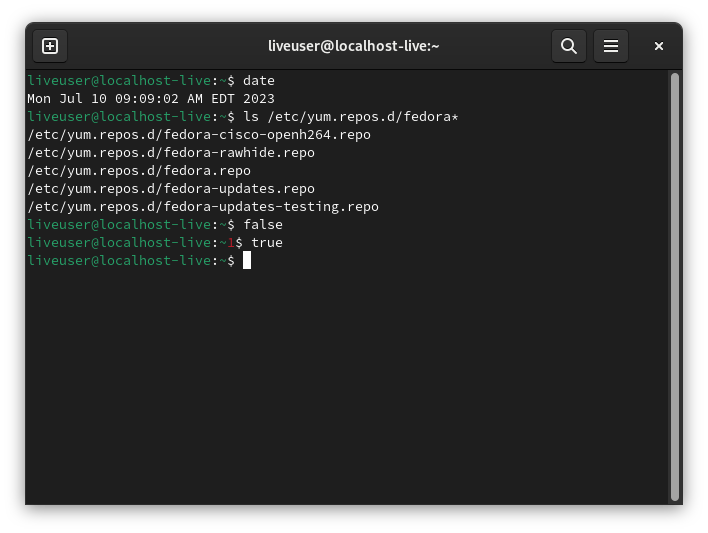
color bash prompt in gnome-terminal]
== Feedback ==
Initial [https://lists.fedoraproject.org/archives/list/devel@lists.fedoraproject.org/thread/B5AJS3FIIPMF3KNWM7HRUNI7ISA2AKBR/#B5AJS3FIIPMF3KNWM7HRUNI7ISA2AKBR
devel list discussion thread]
There seems to be a general desire to have a colored prompt like other
popular distros, which commonly use green etc, though some concerns
were raised about colorblind users. However given that the original
prompt was black & white, and the new one while colored will still be
essentially monochromatic, it should be less of a problem and users
will easily be able to turn off or change any color introduced.
== Benefit to Fedora ==
Fedora will have a more modern and distinct default shell prompt.
== Scope ==
* Proposal owners:
** update the default bash PS1 to a simple essentially monochromatic
prompt (restricted to interactive color terminals).
** like the old default prompt, no external commands or processes will
be run by PS1 by default
* Other developers: bash and/or setup package maintainers to be
consulted on the preferred implementation file location
* Release engineering: [https://pagure.io/releng/issues #Releng issue number]
* Policies and guidelines: N/A (not needed for this Change)
* Trademark approval: N/A (not needed for this Change)
* Alignment with Community Initiatives:
== Upgrade/compatibility impact ==
No impact for rpm editions, ostree editions may gain the default color
prompt if they include its package.
== How To Test ==
* install Fedora and test the new PS1 prompt in various terminals and scenarios
** desktop default terminals should be expected to render the new prompt well
* try customizing the prompt theme by setting for example
`PROMPT_COLOR='1;33'` (bright/bold yellow), etc
A proof of concept can be tested today with
https://copr.fedorainfracloud.org/coprs/petersen/bash-color-prompt/
([https://copr-dist-git.fedorainfracloud.org/cgit/petersen/bash-color-prompt/bash-color-prompt.git/tree/
source git repo])
== User Experience ==
Fedora users will now benefit from a clear self-colored shell prompt,
which should make the separation between command outputs and shell
prompts much clearer and they can also easily change the prompt
coloring in real-time as they desire.
== Dependencies ==
None
== Contingency Plan ==
* Contingency mechanism: Change owner will revert PS1 back to monochrome prompt
* Contingency deadline: Beta freeze
* Blocks release? Yes
== Documentation ==
[https://en.wikipedia.org/wiki/ANSI_escape_code#SGR_(Select_Graphic_Rendition)_parameters
ANSI color attributes] (Wikipedia)
== Release Notes ==
The default shell prompt is now in a distinct color for increased
clarity and the theme can be customized.
--
Aoife Moloney
Product Owner
Community Platform Engineering Team
Red Hat EMEA
Communications House
Cork Road
Waterford
_______________________________________________
devel-announce mailing list -- devel-announce@lists.fedoraproject.org
To unsubscribe send an email to devel-announce-leave@lists.fedoraproject.org
Fedora Code of Conduct: https://docs.fedoraproject.org/en-US/project/code-of-conduct/
List Guidelines: https://fedoraproject.org/wiki/Mailing_list_guidelines
List Archives: https://lists.fedoraproject.org/archives/list/devel-announce@lists.fedoraproject.org
Do not reply to spam, report it: https://pagure.io/fedora-infrastructure/new_issue
Tuesday, July 4, 2023
[USN-6200-1] ImageMagick vulnerabilities
==========================================================================
Ubuntu Security Notice USN-6200-1
July 04, 2023
imagemagick vulnerabilities
==========================================================================
A security issue affects these releases of Ubuntu and its derivatives:
- Ubuntu 23.04
- Ubuntu 22.10
- Ubuntu 22.04 LTS (Available with Ubuntu Pro)
- Ubuntu 20.04 LTS
- Ubuntu 18.04 LTS (Available with Ubuntu Pro)
- Ubuntu 16.04 LTS (Available with Ubuntu Pro)
Summary:
Several security issues were fixed in ImageMagick.
Software Description:
- imagemagick: Image manipulation programs and library
Details:
It was discovered that ImageMagick incorrectly handled the "-authenticate"
option for password-protected PDF files. An attacker could possibly use
this issue to inject additional shell commands and perform arbitrary code
execution. This issue only affected Ubuntu 20.04 LTS. (CVE-2020-29599)
It was discovered that ImageMagick incorrectly handled certain values
when processing PDF files. If a user or automated system using ImageMagick
were tricked into opening a specially crafted PDF file, an attacker could
exploit this to cause a denial of service. This issue only affected Ubuntu
20.04 LTS. (CVE-2021-20224)
Zhang Xiaohui discovered that ImageMagick incorrectly handled certain
values when processing image data. If a user or automated system using
ImageMagick were tricked into opening a specially crafted image, an
attacker could exploit this to cause a denial of service. This issue only
affected Ubuntu 20.04 LTS. (CVE-2021-20241, CVE-2021-20243)
It was discovered that ImageMagick incorrectly handled certain values
when processing visual effects based image files. By tricking a user into
opening a specially crafted image file, an attacker could crash the
application causing a denial of service. This issue only affected Ubuntu
20.04 LTS. (CVE-2021-20244, CVE-2021-20309)
It was discovered that ImageMagick incorrectly handled certain values
when performing resampling operations. By tricking a user into opening
a specially crafted image file, an attacker could crash the application
causing a denial of service. This issue only affected Ubuntu 20.04 LTS.
(CVE-2021-20246)
It was discovered that ImageMagick incorrectly handled certain values
when processing thumbnail image data. By tricking a user into opening
a specially crafted image file, an attacker could crash the application
causing a denial of service. This issue only affected Ubuntu 20.04 LTS.
(CVE-2021-20312)
It was discovered that ImageMagick incorrectly handled memory cleanup
when performing certain cryptographic operations. Under certain conditions
sensitive cryptographic information could be disclosed. This issue only
affected Ubuntu 20.04 LTS. (CVE-2021-20313)
It was discovered that ImageMagick did not use the correct rights when
specifically excluded by a module policy. An attacker could use this issue
to read and write certain restricted files. This issue only affected Ubuntu
20.04 LTS. (CVE-2021-39212)
It was discovered that ImageMagick incorrectly handled memory under certain
circumstances. If a user were tricked into opening a specially crafted
image file, an attacker could possibly exploit this issue to cause a denial
of service or other unspecified impact. This issue only affected Ubuntu
20.04 LTS. (CVE-2022-28463, CVE-2022-32545, CVE-2022-32546, CVE-2022-32547)
It was discovered that ImageMagick incorrectly handled memory under certain
circumstances. If a user were tricked into opening a specially crafted
image file, an attacker could possibly exploit this issue to cause a denial
of service or other unspecified impact. This issue only affected Ubuntu
22.04 LTS, Ubuntu 22.10, and Ubuntu 23.04. (CVE-2021-3610, CVE-2023-1906,
CVE-2023-3428)
It was discovered that ImageMagick incorrectly handled certain values
when processing specially crafted SVG files. By tricking a user into
opening a specially crafted SVG file, an attacker could crash the
application causing a denial of service. This issue only affected Ubuntu
20.04 LTS, Ubuntu 22.04 LTS, Ubuntu 22.10, and Ubuntu 23.04. (CVE-2023-1289)
It was discovered that ImageMagick incorrectly handled memory under certain
circumstances. If a user were tricked into opening a specially crafted
tiff file, an attacker could possibly exploit this issue to cause a denial
of service or other unspecified impact. This issue only affected Ubuntu
22.04 LTS, Ubuntu 22.10, and Ubuntu 23.04. (CVE-2023-3195)
It was discovered that ImageMagick incorrectly handled memory under certain
circumstances. If a user were tricked into opening a specially crafted
image file, an attacker could possibly exploit this issue to cause a denial
of service or other unspecified impact. (CVE-2023-34151)
Update instructions:
The problem can be corrected by updating your system to the following
package versions:
Ubuntu 23.04:
imagemagick 8:6.9.11.60+dfsg-1.6ubuntu0.23.04.1
imagemagick-6-common 8:6.9.11.60+dfsg-1.6ubuntu0.23.04.1
imagemagick-6.q16 8:6.9.11.60+dfsg-1.6ubuntu0.23.04.1
imagemagick-6.q16hdri 8:6.9.11.60+dfsg-1.6ubuntu0.23.04.1
imagemagick-common 8:6.9.11.60+dfsg-1.6ubuntu0.23.04.1
libimage-magick-perl 8:6.9.11.60+dfsg-1.6ubuntu0.23.04.1
libimage-magick-q16-perl 8:6.9.11.60+dfsg-1.6ubuntu0.23.04.1
libmagick++-6.q16-8 8:6.9.11.60+dfsg-1.6ubuntu0.23.04.1
libmagick++-6.q16-dev 8:6.9.11.60+dfsg-1.6ubuntu0.23.04.1
libmagick++-6.q16hdri-8 8:6.9.11.60+dfsg-1.6ubuntu0.23.04.1
libmagick++-6.q16hdri-dev 8:6.9.11.60+dfsg-1.6ubuntu0.23.04.1
libmagick++-dev 8:6.9.11.60+dfsg-1.6ubuntu0.23.04.1
libmagickcore-6-headers 8:6.9.11.60+dfsg-1.6ubuntu0.23.04.1
libmagickcore-6.q16-6 8:6.9.11.60+dfsg-1.6ubuntu0.23.04.1
libmagickcore-6.q16hdri-6 8:6.9.11.60+dfsg-1.6ubuntu0.23.04.1
libmagickcore-dev 8:6.9.11.60+dfsg-1.6ubuntu0.23.04.1
libmagickwand-6.q16-6 8:6.9.11.60+dfsg-1.6ubuntu0.23.04.1
libmagickwand-6.q16-dev 8:6.9.11.60+dfsg-1.6ubuntu0.23.04.1
libmagickwand-dev 8:6.9.11.60+dfsg-1.6ubuntu0.23.04.1
perlmagick 8:6.9.11.60+dfsg-1.6ubuntu0.23.04.1
Ubuntu 22.10:
imagemagick 8:6.9.11.60+dfsg-1.3ubuntu0.22.10.5
imagemagick-6-common 8:6.9.11.60+dfsg-1.3ubuntu0.22.10.5
imagemagick-6.q16 8:6.9.11.60+dfsg-1.3ubuntu0.22.10.5
imagemagick-6.q16hdri 8:6.9.11.60+dfsg-1.3ubuntu0.22.10.5
imagemagick-common 8:6.9.11.60+dfsg-1.3ubuntu0.22.10.5
libimage-magick-perl 8:6.9.11.60+dfsg-1.3ubuntu0.22.10.5
libimage-magick-q16-perl 8:6.9.11.60+dfsg-1.3ubuntu0.22.10.5
libmagick++-6.q16-8 8:6.9.11.60+dfsg-1.3ubuntu0.22.10.5
libmagick++-6.q16-dev 8:6.9.11.60+dfsg-1.3ubuntu0.22.10.5
libmagick++-6.q16hdri-8 8:6.9.11.60+dfsg-1.3ubuntu0.22.10.5
libmagick++-6.q16hdri-dev 8:6.9.11.60+dfsg-1.3ubuntu0.22.10.5
libmagick++-dev 8:6.9.11.60+dfsg-1.3ubuntu0.22.10.5
libmagickcore-6-headers 8:6.9.11.60+dfsg-1.3ubuntu0.22.10.5
libmagickcore-6.q16-6 8:6.9.11.60+dfsg-1.3ubuntu0.22.10.5
libmagickcore-6.q16-dev 8:6.9.11.60+dfsg-1.3ubuntu0.22.10.5
libmagickcore-6.q16hdri-6 8:6.9.11.60+dfsg-1.3ubuntu0.22.10.5
libmagickcore-dev 8:6.9.11.60+dfsg-1.3ubuntu0.22.10.5
libmagickwand-6.q16-6 8:6.9.11.60+dfsg-1.3ubuntu0.22.10.5
libmagickwand-6.q16-dev 8:6.9.11.60+dfsg-1.3ubuntu0.22.10.5
libmagickwand-dev 8:6.9.11.60+dfsg-1.3ubuntu0.22.10.5
perlmagick 8:6.9.11.60+dfsg-1.3ubuntu0.22.10.5
Ubuntu 22.04 LTS (Available with Ubuntu Pro):
imagemagick 8:6.9.11.60+dfsg-1.3ubuntu0.22.04.3+esm2
imagemagick-6-common 8:6.9.11.60+dfsg-1.3ubuntu0.22.04.3+esm2
imagemagick-6.q16 8:6.9.11.60+dfsg-1.3ubuntu0.22.04.3+esm2
imagemagick-6.q16hdri 8:6.9.11.60+dfsg-1.3ubuntu0.22.04.3+esm2
imagemagick-common 8:6.9.11.60+dfsg-1.3ubuntu0.22.04.3+esm2
libimage-magick-perl 8:6.9.11.60+dfsg-1.3ubuntu0.22.04.3+esm2
libimage-magick-q16-perl 8:6.9.11.60+dfsg-1.3ubuntu0.22.04.3+esm2
libmagick++-6.q16-8 8:6.9.11.60+dfsg-1.3ubuntu0.22.04.3+esm2
libmagick++-6.q16-dev 8:6.9.11.60+dfsg-1.3ubuntu0.22.04.3+esm2
libmagick++-6.q16hdri-8 8:6.9.11.60+dfsg-1.3ubuntu0.22.04.3+esm2
libmagick++-6.q16hdri-dev 8:6.9.11.60+dfsg-1.3ubuntu0.22.04.3+esm2
libmagick++-dev 8:6.9.11.60+dfsg-1.3ubuntu0.22.04.3+esm2
libmagickcore-6-headers 8:6.9.11.60+dfsg-1.3ubuntu0.22.04.3+esm2
libmagickcore-6.q16-6 8:6.9.11.60+dfsg-1.3ubuntu0.22.04.3+esm2
libmagickcore-6.q16-dev 8:6.9.11.60+dfsg-1.3ubuntu0.22.04.3+esm2
libmagickcore-6.q16hdri-6 8:6.9.11.60+dfsg-1.3ubuntu0.22.04.3+esm2
libmagickcore-dev 8:6.9.11.60+dfsg-1.3ubuntu0.22.04.3+esm2
libmagickwand-6.q16-6 8:6.9.11.60+dfsg-1.3ubuntu0.22.04.3+esm2
libmagickwand-6.q16-dev 8:6.9.11.60+dfsg-1.3ubuntu0.22.04.3+esm2
libmagickwand-dev 8:6.9.11.60+dfsg-1.3ubuntu0.22.04.3+esm2
perlmagick 8:6.9.11.60+dfsg-1.3ubuntu0.22.04.3+esm2
Ubuntu 20.04 LTS:
imagemagick 8:6.9.10.23+dfsg-2.1ubuntu11.9
imagemagick-6-common 8:6.9.10.23+dfsg-2.1ubuntu11.9
imagemagick-6.q16 8:6.9.10.23+dfsg-2.1ubuntu11.9
imagemagick-6.q16hdri 8:6.9.10.23+dfsg-2.1ubuntu11.9
imagemagick-common 8:6.9.10.23+dfsg-2.1ubuntu11.9
libimage-magick-perl 8:6.9.10.23+dfsg-2.1ubuntu11.9
libimage-magick-q16-perl 8:6.9.10.23+dfsg-2.1ubuntu11.9
libmagick++-6.q16-8 8:6.9.10.23+dfsg-2.1ubuntu11.9
libmagick++-6.q16-dev 8:6.9.10.23+dfsg-2.1ubuntu11.9
libmagick++-6.q16hdri-8 8:6.9.10.23+dfsg-2.1ubuntu11.9
libmagick++-6.q16hdri-dev 8:6.9.10.23+dfsg-2.1ubuntu11.9
libmagick++-dev 8:6.9.10.23+dfsg-2.1ubuntu11.9
libmagickcore-6-headers 8:6.9.10.23+dfsg-2.1ubuntu11.9
libmagickcore-6.q16-6 8:6.9.10.23+dfsg-2.1ubuntu11.9
libmagickcore-6.q16-dev 8:6.9.10.23+dfsg-2.1ubuntu11.9
libmagickcore-6.q16hdri-6 8:6.9.10.23+dfsg-2.1ubuntu11.9
libmagickcore-dev 8:6.9.10.23+dfsg-2.1ubuntu11.9
libmagickwand-6.q16-6 8:6.9.10.23+dfsg-2.1ubuntu11.9
libmagickwand-6.q16-dev 8:6.9.10.23+dfsg-2.1ubuntu11.9
libmagickwand-dev 8:6.9.10.23+dfsg-2.1ubuntu11.9
perlmagick 8:6.9.10.23+dfsg-2.1ubuntu11.9
Ubuntu 18.04 LTS (Available with Ubuntu Pro):
imagemagick 8:6.9.7.4+dfsg-16ubuntu6.15+esm1
imagemagick-6-common 8:6.9.7.4+dfsg-16ubuntu6.15+esm1
imagemagick-6.q16 8:6.9.7.4+dfsg-16ubuntu6.15+esm1
imagemagick-6.q16hdri 8:6.9.7.4+dfsg-16ubuntu6.15+esm1
imagemagick-common 8:6.9.7.4+dfsg-16ubuntu6.15+esm1
libimage-magick-perl 8:6.9.7.4+dfsg-16ubuntu6.15+esm1
libimage-magick-q16-perl 8:6.9.7.4+dfsg-16ubuntu6.15+esm1
libmagick++-6.q16-7 8:6.9.7.4+dfsg-16ubuntu6.15+esm1
libmagick++-6.q16-dev 8:6.9.7.4+dfsg-16ubuntu6.15+esm1
libmagick++-6.q16hdri-7 8:6.9.7.4+dfsg-16ubuntu6.15+esm1
libmagick++-6.q16hdri-dev 8:6.9.7.4+dfsg-16ubuntu6.15+esm1
libmagick++-dev 8:6.9.7.4+dfsg-16ubuntu6.15+esm1
libmagickcore-6-headers 8:6.9.7.4+dfsg-16ubuntu6.15+esm1
libmagickcore-6.q16-3 8:6.9.7.4+dfsg-16ubuntu6.15+esm1
libmagickcore-6.q16-dev 8:6.9.7.4+dfsg-16ubuntu6.15+esm1
libmagickcore-6.q16hdri-3 8:6.9.7.4+dfsg-16ubuntu6.15+esm1
libmagickcore-dev 8:6.9.7.4+dfsg-16ubuntu6.15+esm1
libmagickwand-6.q16-3 8:6.9.7.4+dfsg-16ubuntu6.15+esm1
libmagickwand-6.q16-dev 8:6.9.7.4+dfsg-16ubuntu6.15+esm1
libmagickwand-dev 8:6.9.7.4+dfsg-16ubuntu6.15+esm1
perlmagick 8:6.9.7.4+dfsg-16ubuntu6.15+esm1
Ubuntu 16.04 LTS (Available with Ubuntu Pro):
imagemagick 8:6.8.9.9-7ubuntu5.16+esm8
imagemagick-6.q16 8:6.8.9.9-7ubuntu5.16+esm8
imagemagick-common 8:6.8.9.9-7ubuntu5.16+esm8
libimage-magick-perl 8:6.8.9.9-7ubuntu5.16+esm8
libimage-magick-q16-perl 8:6.8.9.9-7ubuntu5.16+esm8
libmagick++-6.q16-5v5 8:6.8.9.9-7ubuntu5.16+esm8
libmagick++-6.q16-dev 8:6.8.9.9-7ubuntu5.16+esm8
libmagick++-dev 8:6.8.9.9-7ubuntu5.16+esm8
libmagickcore-6-headers 8:6.8.9.9-7ubuntu5.16+esm8
libmagickcore-6.q16-2 8:6.8.9.9-7ubuntu5.16+esm8
libmagickcore-6.q16-dev 8:6.8.9.9-7ubuntu5.16+esm8
libmagickcore-dev 8:6.8.9.9-7ubuntu5.16+esm8
libmagickwand-6.q16-2 8:6.8.9.9-7ubuntu5.16+esm8
libmagickwand-6.q16-dev 8:6.8.9.9-7ubuntu5.16+esm8
libmagickwand-dev 8:6.8.9.9-7ubuntu5.16+esm8
perlmagick 8:6.8.9.9-7ubuntu5.16+esm8
In general, a standard system update will make all the necessary changes.
References:
https://ubuntu.com/security/notices/USN-6200-1
CVE-2020-29599, CVE-2021-20224, CVE-2021-20241, CVE-2021-20243,
CVE-2021-20244, CVE-2021-20246, CVE-2021-20309, CVE-2021-20312,
CVE-2021-20313, CVE-2021-3610, CVE-2021-39212, CVE-2022-28463,
CVE-2022-32545, CVE-2022-32546, CVE-2022-32547, CVE-2023-1289,
CVE-2023-1906, CVE-2023-3195, CVE-2023-34151, CVE-2023-3428
Package Information:
https://launchpad.net/ubuntu/+source/imagemagick/8:6.9.11.60+dfsg-1.6ubuntu0.23.04.1
https://launchpad.net/ubuntu/+source/imagemagick/8:6.9.11.60+dfsg-1.3ubuntu0.22.10.5
https://launchpad.net/ubuntu/+source/imagemagick/8:6.9.10.23+dfsg-2.1ubuntu11.9
Ubuntu Security Notice USN-6200-1
July 04, 2023
imagemagick vulnerabilities
==========================================================================
A security issue affects these releases of Ubuntu and its derivatives:
- Ubuntu 23.04
- Ubuntu 22.10
- Ubuntu 22.04 LTS (Available with Ubuntu Pro)
- Ubuntu 20.04 LTS
- Ubuntu 18.04 LTS (Available with Ubuntu Pro)
- Ubuntu 16.04 LTS (Available with Ubuntu Pro)
Summary:
Several security issues were fixed in ImageMagick.
Software Description:
- imagemagick: Image manipulation programs and library
Details:
It was discovered that ImageMagick incorrectly handled the "-authenticate"
option for password-protected PDF files. An attacker could possibly use
this issue to inject additional shell commands and perform arbitrary code
execution. This issue only affected Ubuntu 20.04 LTS. (CVE-2020-29599)
It was discovered that ImageMagick incorrectly handled certain values
when processing PDF files. If a user or automated system using ImageMagick
were tricked into opening a specially crafted PDF file, an attacker could
exploit this to cause a denial of service. This issue only affected Ubuntu
20.04 LTS. (CVE-2021-20224)
Zhang Xiaohui discovered that ImageMagick incorrectly handled certain
values when processing image data. If a user or automated system using
ImageMagick were tricked into opening a specially crafted image, an
attacker could exploit this to cause a denial of service. This issue only
affected Ubuntu 20.04 LTS. (CVE-2021-20241, CVE-2021-20243)
It was discovered that ImageMagick incorrectly handled certain values
when processing visual effects based image files. By tricking a user into
opening a specially crafted image file, an attacker could crash the
application causing a denial of service. This issue only affected Ubuntu
20.04 LTS. (CVE-2021-20244, CVE-2021-20309)
It was discovered that ImageMagick incorrectly handled certain values
when performing resampling operations. By tricking a user into opening
a specially crafted image file, an attacker could crash the application
causing a denial of service. This issue only affected Ubuntu 20.04 LTS.
(CVE-2021-20246)
It was discovered that ImageMagick incorrectly handled certain values
when processing thumbnail image data. By tricking a user into opening
a specially crafted image file, an attacker could crash the application
causing a denial of service. This issue only affected Ubuntu 20.04 LTS.
(CVE-2021-20312)
It was discovered that ImageMagick incorrectly handled memory cleanup
when performing certain cryptographic operations. Under certain conditions
sensitive cryptographic information could be disclosed. This issue only
affected Ubuntu 20.04 LTS. (CVE-2021-20313)
It was discovered that ImageMagick did not use the correct rights when
specifically excluded by a module policy. An attacker could use this issue
to read and write certain restricted files. This issue only affected Ubuntu
20.04 LTS. (CVE-2021-39212)
It was discovered that ImageMagick incorrectly handled memory under certain
circumstances. If a user were tricked into opening a specially crafted
image file, an attacker could possibly exploit this issue to cause a denial
of service or other unspecified impact. This issue only affected Ubuntu
20.04 LTS. (CVE-2022-28463, CVE-2022-32545, CVE-2022-32546, CVE-2022-32547)
It was discovered that ImageMagick incorrectly handled memory under certain
circumstances. If a user were tricked into opening a specially crafted
image file, an attacker could possibly exploit this issue to cause a denial
of service or other unspecified impact. This issue only affected Ubuntu
22.04 LTS, Ubuntu 22.10, and Ubuntu 23.04. (CVE-2021-3610, CVE-2023-1906,
CVE-2023-3428)
It was discovered that ImageMagick incorrectly handled certain values
when processing specially crafted SVG files. By tricking a user into
opening a specially crafted SVG file, an attacker could crash the
application causing a denial of service. This issue only affected Ubuntu
20.04 LTS, Ubuntu 22.04 LTS, Ubuntu 22.10, and Ubuntu 23.04. (CVE-2023-1289)
It was discovered that ImageMagick incorrectly handled memory under certain
circumstances. If a user were tricked into opening a specially crafted
tiff file, an attacker could possibly exploit this issue to cause a denial
of service or other unspecified impact. This issue only affected Ubuntu
22.04 LTS, Ubuntu 22.10, and Ubuntu 23.04. (CVE-2023-3195)
It was discovered that ImageMagick incorrectly handled memory under certain
circumstances. If a user were tricked into opening a specially crafted
image file, an attacker could possibly exploit this issue to cause a denial
of service or other unspecified impact. (CVE-2023-34151)
Update instructions:
The problem can be corrected by updating your system to the following
package versions:
Ubuntu 23.04:
imagemagick 8:6.9.11.60+dfsg-1.6ubuntu0.23.04.1
imagemagick-6-common 8:6.9.11.60+dfsg-1.6ubuntu0.23.04.1
imagemagick-6.q16 8:6.9.11.60+dfsg-1.6ubuntu0.23.04.1
imagemagick-6.q16hdri 8:6.9.11.60+dfsg-1.6ubuntu0.23.04.1
imagemagick-common 8:6.9.11.60+dfsg-1.6ubuntu0.23.04.1
libimage-magick-perl 8:6.9.11.60+dfsg-1.6ubuntu0.23.04.1
libimage-magick-q16-perl 8:6.9.11.60+dfsg-1.6ubuntu0.23.04.1
libmagick++-6.q16-8 8:6.9.11.60+dfsg-1.6ubuntu0.23.04.1
libmagick++-6.q16-dev 8:6.9.11.60+dfsg-1.6ubuntu0.23.04.1
libmagick++-6.q16hdri-8 8:6.9.11.60+dfsg-1.6ubuntu0.23.04.1
libmagick++-6.q16hdri-dev 8:6.9.11.60+dfsg-1.6ubuntu0.23.04.1
libmagick++-dev 8:6.9.11.60+dfsg-1.6ubuntu0.23.04.1
libmagickcore-6-headers 8:6.9.11.60+dfsg-1.6ubuntu0.23.04.1
libmagickcore-6.q16-6 8:6.9.11.60+dfsg-1.6ubuntu0.23.04.1
libmagickcore-6.q16hdri-6 8:6.9.11.60+dfsg-1.6ubuntu0.23.04.1
libmagickcore-dev 8:6.9.11.60+dfsg-1.6ubuntu0.23.04.1
libmagickwand-6.q16-6 8:6.9.11.60+dfsg-1.6ubuntu0.23.04.1
libmagickwand-6.q16-dev 8:6.9.11.60+dfsg-1.6ubuntu0.23.04.1
libmagickwand-dev 8:6.9.11.60+dfsg-1.6ubuntu0.23.04.1
perlmagick 8:6.9.11.60+dfsg-1.6ubuntu0.23.04.1
Ubuntu 22.10:
imagemagick 8:6.9.11.60+dfsg-1.3ubuntu0.22.10.5
imagemagick-6-common 8:6.9.11.60+dfsg-1.3ubuntu0.22.10.5
imagemagick-6.q16 8:6.9.11.60+dfsg-1.3ubuntu0.22.10.5
imagemagick-6.q16hdri 8:6.9.11.60+dfsg-1.3ubuntu0.22.10.5
imagemagick-common 8:6.9.11.60+dfsg-1.3ubuntu0.22.10.5
libimage-magick-perl 8:6.9.11.60+dfsg-1.3ubuntu0.22.10.5
libimage-magick-q16-perl 8:6.9.11.60+dfsg-1.3ubuntu0.22.10.5
libmagick++-6.q16-8 8:6.9.11.60+dfsg-1.3ubuntu0.22.10.5
libmagick++-6.q16-dev 8:6.9.11.60+dfsg-1.3ubuntu0.22.10.5
libmagick++-6.q16hdri-8 8:6.9.11.60+dfsg-1.3ubuntu0.22.10.5
libmagick++-6.q16hdri-dev 8:6.9.11.60+dfsg-1.3ubuntu0.22.10.5
libmagick++-dev 8:6.9.11.60+dfsg-1.3ubuntu0.22.10.5
libmagickcore-6-headers 8:6.9.11.60+dfsg-1.3ubuntu0.22.10.5
libmagickcore-6.q16-6 8:6.9.11.60+dfsg-1.3ubuntu0.22.10.5
libmagickcore-6.q16-dev 8:6.9.11.60+dfsg-1.3ubuntu0.22.10.5
libmagickcore-6.q16hdri-6 8:6.9.11.60+dfsg-1.3ubuntu0.22.10.5
libmagickcore-dev 8:6.9.11.60+dfsg-1.3ubuntu0.22.10.5
libmagickwand-6.q16-6 8:6.9.11.60+dfsg-1.3ubuntu0.22.10.5
libmagickwand-6.q16-dev 8:6.9.11.60+dfsg-1.3ubuntu0.22.10.5
libmagickwand-dev 8:6.9.11.60+dfsg-1.3ubuntu0.22.10.5
perlmagick 8:6.9.11.60+dfsg-1.3ubuntu0.22.10.5
Ubuntu 22.04 LTS (Available with Ubuntu Pro):
imagemagick 8:6.9.11.60+dfsg-1.3ubuntu0.22.04.3+esm2
imagemagick-6-common 8:6.9.11.60+dfsg-1.3ubuntu0.22.04.3+esm2
imagemagick-6.q16 8:6.9.11.60+dfsg-1.3ubuntu0.22.04.3+esm2
imagemagick-6.q16hdri 8:6.9.11.60+dfsg-1.3ubuntu0.22.04.3+esm2
imagemagick-common 8:6.9.11.60+dfsg-1.3ubuntu0.22.04.3+esm2
libimage-magick-perl 8:6.9.11.60+dfsg-1.3ubuntu0.22.04.3+esm2
libimage-magick-q16-perl 8:6.9.11.60+dfsg-1.3ubuntu0.22.04.3+esm2
libmagick++-6.q16-8 8:6.9.11.60+dfsg-1.3ubuntu0.22.04.3+esm2
libmagick++-6.q16-dev 8:6.9.11.60+dfsg-1.3ubuntu0.22.04.3+esm2
libmagick++-6.q16hdri-8 8:6.9.11.60+dfsg-1.3ubuntu0.22.04.3+esm2
libmagick++-6.q16hdri-dev 8:6.9.11.60+dfsg-1.3ubuntu0.22.04.3+esm2
libmagick++-dev 8:6.9.11.60+dfsg-1.3ubuntu0.22.04.3+esm2
libmagickcore-6-headers 8:6.9.11.60+dfsg-1.3ubuntu0.22.04.3+esm2
libmagickcore-6.q16-6 8:6.9.11.60+dfsg-1.3ubuntu0.22.04.3+esm2
libmagickcore-6.q16-dev 8:6.9.11.60+dfsg-1.3ubuntu0.22.04.3+esm2
libmagickcore-6.q16hdri-6 8:6.9.11.60+dfsg-1.3ubuntu0.22.04.3+esm2
libmagickcore-dev 8:6.9.11.60+dfsg-1.3ubuntu0.22.04.3+esm2
libmagickwand-6.q16-6 8:6.9.11.60+dfsg-1.3ubuntu0.22.04.3+esm2
libmagickwand-6.q16-dev 8:6.9.11.60+dfsg-1.3ubuntu0.22.04.3+esm2
libmagickwand-dev 8:6.9.11.60+dfsg-1.3ubuntu0.22.04.3+esm2
perlmagick 8:6.9.11.60+dfsg-1.3ubuntu0.22.04.3+esm2
Ubuntu 20.04 LTS:
imagemagick 8:6.9.10.23+dfsg-2.1ubuntu11.9
imagemagick-6-common 8:6.9.10.23+dfsg-2.1ubuntu11.9
imagemagick-6.q16 8:6.9.10.23+dfsg-2.1ubuntu11.9
imagemagick-6.q16hdri 8:6.9.10.23+dfsg-2.1ubuntu11.9
imagemagick-common 8:6.9.10.23+dfsg-2.1ubuntu11.9
libimage-magick-perl 8:6.9.10.23+dfsg-2.1ubuntu11.9
libimage-magick-q16-perl 8:6.9.10.23+dfsg-2.1ubuntu11.9
libmagick++-6.q16-8 8:6.9.10.23+dfsg-2.1ubuntu11.9
libmagick++-6.q16-dev 8:6.9.10.23+dfsg-2.1ubuntu11.9
libmagick++-6.q16hdri-8 8:6.9.10.23+dfsg-2.1ubuntu11.9
libmagick++-6.q16hdri-dev 8:6.9.10.23+dfsg-2.1ubuntu11.9
libmagick++-dev 8:6.9.10.23+dfsg-2.1ubuntu11.9
libmagickcore-6-headers 8:6.9.10.23+dfsg-2.1ubuntu11.9
libmagickcore-6.q16-6 8:6.9.10.23+dfsg-2.1ubuntu11.9
libmagickcore-6.q16-dev 8:6.9.10.23+dfsg-2.1ubuntu11.9
libmagickcore-6.q16hdri-6 8:6.9.10.23+dfsg-2.1ubuntu11.9
libmagickcore-dev 8:6.9.10.23+dfsg-2.1ubuntu11.9
libmagickwand-6.q16-6 8:6.9.10.23+dfsg-2.1ubuntu11.9
libmagickwand-6.q16-dev 8:6.9.10.23+dfsg-2.1ubuntu11.9
libmagickwand-dev 8:6.9.10.23+dfsg-2.1ubuntu11.9
perlmagick 8:6.9.10.23+dfsg-2.1ubuntu11.9
Ubuntu 18.04 LTS (Available with Ubuntu Pro):
imagemagick 8:6.9.7.4+dfsg-16ubuntu6.15+esm1
imagemagick-6-common 8:6.9.7.4+dfsg-16ubuntu6.15+esm1
imagemagick-6.q16 8:6.9.7.4+dfsg-16ubuntu6.15+esm1
imagemagick-6.q16hdri 8:6.9.7.4+dfsg-16ubuntu6.15+esm1
imagemagick-common 8:6.9.7.4+dfsg-16ubuntu6.15+esm1
libimage-magick-perl 8:6.9.7.4+dfsg-16ubuntu6.15+esm1
libimage-magick-q16-perl 8:6.9.7.4+dfsg-16ubuntu6.15+esm1
libmagick++-6.q16-7 8:6.9.7.4+dfsg-16ubuntu6.15+esm1
libmagick++-6.q16-dev 8:6.9.7.4+dfsg-16ubuntu6.15+esm1
libmagick++-6.q16hdri-7 8:6.9.7.4+dfsg-16ubuntu6.15+esm1
libmagick++-6.q16hdri-dev 8:6.9.7.4+dfsg-16ubuntu6.15+esm1
libmagick++-dev 8:6.9.7.4+dfsg-16ubuntu6.15+esm1
libmagickcore-6-headers 8:6.9.7.4+dfsg-16ubuntu6.15+esm1
libmagickcore-6.q16-3 8:6.9.7.4+dfsg-16ubuntu6.15+esm1
libmagickcore-6.q16-dev 8:6.9.7.4+dfsg-16ubuntu6.15+esm1
libmagickcore-6.q16hdri-3 8:6.9.7.4+dfsg-16ubuntu6.15+esm1
libmagickcore-dev 8:6.9.7.4+dfsg-16ubuntu6.15+esm1
libmagickwand-6.q16-3 8:6.9.7.4+dfsg-16ubuntu6.15+esm1
libmagickwand-6.q16-dev 8:6.9.7.4+dfsg-16ubuntu6.15+esm1
libmagickwand-dev 8:6.9.7.4+dfsg-16ubuntu6.15+esm1
perlmagick 8:6.9.7.4+dfsg-16ubuntu6.15+esm1
Ubuntu 16.04 LTS (Available with Ubuntu Pro):
imagemagick 8:6.8.9.9-7ubuntu5.16+esm8
imagemagick-6.q16 8:6.8.9.9-7ubuntu5.16+esm8
imagemagick-common 8:6.8.9.9-7ubuntu5.16+esm8
libimage-magick-perl 8:6.8.9.9-7ubuntu5.16+esm8
libimage-magick-q16-perl 8:6.8.9.9-7ubuntu5.16+esm8
libmagick++-6.q16-5v5 8:6.8.9.9-7ubuntu5.16+esm8
libmagick++-6.q16-dev 8:6.8.9.9-7ubuntu5.16+esm8
libmagick++-dev 8:6.8.9.9-7ubuntu5.16+esm8
libmagickcore-6-headers 8:6.8.9.9-7ubuntu5.16+esm8
libmagickcore-6.q16-2 8:6.8.9.9-7ubuntu5.16+esm8
libmagickcore-6.q16-dev 8:6.8.9.9-7ubuntu5.16+esm8
libmagickcore-dev 8:6.8.9.9-7ubuntu5.16+esm8
libmagickwand-6.q16-2 8:6.8.9.9-7ubuntu5.16+esm8
libmagickwand-6.q16-dev 8:6.8.9.9-7ubuntu5.16+esm8
libmagickwand-dev 8:6.8.9.9-7ubuntu5.16+esm8
perlmagick 8:6.8.9.9-7ubuntu5.16+esm8
In general, a standard system update will make all the necessary changes.
References:
https://ubuntu.com/security/notices/USN-6200-1
CVE-2020-29599, CVE-2021-20224, CVE-2021-20241, CVE-2021-20243,
CVE-2021-20244, CVE-2021-20246, CVE-2021-20309, CVE-2021-20312,
CVE-2021-20313, CVE-2021-3610, CVE-2021-39212, CVE-2022-28463,
CVE-2022-32545, CVE-2022-32546, CVE-2022-32547, CVE-2023-1289,
CVE-2023-1906, CVE-2023-3195, CVE-2023-34151, CVE-2023-3428
Package Information:
https://launchpad.net/ubuntu/+source/imagemagick/8:6.9.11.60+dfsg-1.6ubuntu0.23.04.1
https://launchpad.net/ubuntu/+source/imagemagick/8:6.9.11.60+dfsg-1.3ubuntu0.22.10.5
https://launchpad.net/ubuntu/+source/imagemagick/8:6.9.10.23+dfsg-2.1ubuntu11.9
Take the Fedora Annual Contributor Survey 2023
Hello, everyone,
Please participate in the Fedora Annual Contributor Survey 2023!
* https://fedoraproject.limequery.com/2023
The survey is targeting Fedora contributors of all kinds and asks about
your default choices of applications and services and familiarity with
the project.
The survey is anonymous, but at the end of the survey you will get the
link which you can use to claim the badge.
The survey will be open until the end of the month, July 31.
For more details about the Survey see
https://docs.fedoraproject.org/en-US/council/procedures/survey/overview/
Thank you for your contribution!
--
Aleksandra Fedorova
Fedora Council
@bookwar:fedora.im on Matrix
_______________________________________________
devel-announce mailing list -- devel-announce@lists.fedoraproject.org
To unsubscribe send an email to devel-announce-leave@lists.fedoraproject.org
Fedora Code of Conduct: https://docs.fedoraproject.org/en-US/project/code-of-conduct/
List Guidelines: https://fedoraproject.org/wiki/Mailing_list_guidelines
List Archives: https://lists.fedoraproject.org/archives/list/devel-announce@lists.fedoraproject.org
Do not reply to spam, report it: https://pagure.io/fedora-infrastructure/new_issue
Please participate in the Fedora Annual Contributor Survey 2023!
* https://fedoraproject.limequery.com/2023
The survey is targeting Fedora contributors of all kinds and asks about
your default choices of applications and services and familiarity with
the project.
The survey is anonymous, but at the end of the survey you will get the
link which you can use to claim the badge.
The survey will be open until the end of the month, July 31.
For more details about the Survey see
https://docs.fedoraproject.org/en-US/council/procedures/survey/overview/
Thank you for your contribution!
--
Aleksandra Fedorova
Fedora Council
@bookwar:fedora.im on Matrix
_______________________________________________
devel-announce mailing list -- devel-announce@lists.fedoraproject.org
To unsubscribe send an email to devel-announce-leave@lists.fedoraproject.org
Fedora Code of Conduct: https://docs.fedoraproject.org/en-US/project/code-of-conduct/
List Guidelines: https://fedoraproject.org/wiki/Mailing_list_guidelines
List Archives: https://lists.fedoraproject.org/archives/list/devel-announce@lists.fedoraproject.org
Do not reply to spam, report it: https://pagure.io/fedora-infrastructure/new_issue
Monday, July 3, 2023
[USN-6199-1] PHP vulnerability
==========================================================================
Ubuntu Security Notice USN-6199-1
July 03, 2023
php7.4, php8.1 vulnerability
==========================================================================
A security issue affects these releases of Ubuntu and its derivatives:
- Ubuntu 23.04
- Ubuntu 22.10
- Ubuntu 22.04 LTS
- Ubuntu 20.04 LTS
Summary:
PHP could be made to expose sensitive information.
Software Description:
- php8.1: HTML-embedded scripting language interpreter
- php7.4: HTML-embedded scripting language interpreter
Details:
It was discovered that PHP incorrectly handled certain Digest
authentication for SOAP. An attacker could possibly use this issue
to expose sensitive information.
Update instructions:
The problem can be corrected by updating your system to the following
package versions:
Ubuntu 23.04:
libapache2-mod-php7.4 8.1.12-1ubuntu4.2
libapache2-mod-php8.0 8.1.12-1ubuntu4.2
libapache2-mod-php8.1 8.1.12-1ubuntu4.2
php8.1 8.1.12-1ubuntu4.2
php8.1-cgi 8.1.12-1ubuntu4.2
php8.1-cli 8.1.12-1ubuntu4.2
php8.1-soap 8.1.12-1ubuntu4.2
Ubuntu 22.10:
libapache2-mod-php7.4 8.1.7-1ubuntu3.5
libapache2-mod-php8.0 8.1.7-1ubuntu3.5
libapache2-mod-php8.1 8.1.7-1ubuntu3.5
php8.1 8.1.7-1ubuntu3.5
php8.1-cgi 8.1.7-1ubuntu3.5
php8.1-cli 8.1.7-1ubuntu3.5
php8.1-soap 8.1.7-1ubuntu3.5
Ubuntu 22.04 LTS:
libapache2-mod-php7.4 8.1.2-1ubuntu2.13
libapache2-mod-php8.0 8.1.2-1ubuntu2.13
libapache2-mod-php8.1 8.1.2-1ubuntu2.13
php8.1 8.1.2-1ubuntu2.13
php8.1-cgi 8.1.2-1ubuntu2.13
php8.1-cli 8.1.2-1ubuntu2.13
php8.1-soap 8.1.2-1ubuntu2.13
php8.1-sqlite3 8.1.2-1ubuntu2.13
Ubuntu 20.04 LTS:
libapache2-mod-php7.4 7.4.3-4ubuntu2.19
php7.4 7.4.3-4ubuntu2.19
php7.4-cgi 7.4.3-4ubuntu2.19
php7.4-cli 7.4.3-4ubuntu2.19
php7.4-soap 7.4.3-4ubuntu2.19
In general, a standard system update will make all the necessary changes.
References:
https://ubuntu.com/security/notices/USN-6199-1
CVE-2023-3247
Package Information:
https://launchpad.net/ubuntu/+source/php8.1/8.1.12-1ubuntu4.2
https://launchpad.net/ubuntu/+source/php8.1/8.1.7-1ubuntu3.5
https://launchpad.net/ubuntu/+source/php8.1/8.1.2-1ubuntu2.13
https://launchpad.net/ubuntu/+source/php7.4/7.4.3-4ubuntu2.19
Ubuntu Security Notice USN-6199-1
July 03, 2023
php7.4, php8.1 vulnerability
==========================================================================
A security issue affects these releases of Ubuntu and its derivatives:
- Ubuntu 23.04
- Ubuntu 22.10
- Ubuntu 22.04 LTS
- Ubuntu 20.04 LTS
Summary:
PHP could be made to expose sensitive information.
Software Description:
- php8.1: HTML-embedded scripting language interpreter
- php7.4: HTML-embedded scripting language interpreter
Details:
It was discovered that PHP incorrectly handled certain Digest
authentication for SOAP. An attacker could possibly use this issue
to expose sensitive information.
Update instructions:
The problem can be corrected by updating your system to the following
package versions:
Ubuntu 23.04:
libapache2-mod-php7.4 8.1.12-1ubuntu4.2
libapache2-mod-php8.0 8.1.12-1ubuntu4.2
libapache2-mod-php8.1 8.1.12-1ubuntu4.2
php8.1 8.1.12-1ubuntu4.2
php8.1-cgi 8.1.12-1ubuntu4.2
php8.1-cli 8.1.12-1ubuntu4.2
php8.1-soap 8.1.12-1ubuntu4.2
Ubuntu 22.10:
libapache2-mod-php7.4 8.1.7-1ubuntu3.5
libapache2-mod-php8.0 8.1.7-1ubuntu3.5
libapache2-mod-php8.1 8.1.7-1ubuntu3.5
php8.1 8.1.7-1ubuntu3.5
php8.1-cgi 8.1.7-1ubuntu3.5
php8.1-cli 8.1.7-1ubuntu3.5
php8.1-soap 8.1.7-1ubuntu3.5
Ubuntu 22.04 LTS:
libapache2-mod-php7.4 8.1.2-1ubuntu2.13
libapache2-mod-php8.0 8.1.2-1ubuntu2.13
libapache2-mod-php8.1 8.1.2-1ubuntu2.13
php8.1 8.1.2-1ubuntu2.13
php8.1-cgi 8.1.2-1ubuntu2.13
php8.1-cli 8.1.2-1ubuntu2.13
php8.1-soap 8.1.2-1ubuntu2.13
php8.1-sqlite3 8.1.2-1ubuntu2.13
Ubuntu 20.04 LTS:
libapache2-mod-php7.4 7.4.3-4ubuntu2.19
php7.4 7.4.3-4ubuntu2.19
php7.4-cgi 7.4.3-4ubuntu2.19
php7.4-cli 7.4.3-4ubuntu2.19
php7.4-soap 7.4.3-4ubuntu2.19
In general, a standard system update will make all the necessary changes.
References:
https://ubuntu.com/security/notices/USN-6199-1
CVE-2023-3247
Package Information:
https://launchpad.net/ubuntu/+source/php8.1/8.1.12-1ubuntu4.2
https://launchpad.net/ubuntu/+source/php8.1/8.1.7-1ubuntu3.5
https://launchpad.net/ubuntu/+source/php8.1/8.1.2-1ubuntu2.13
https://launchpad.net/ubuntu/+source/php7.4/7.4.3-4ubuntu2.19
[USN-6198-1] GNU Screen vulnerability
==========================================================================
Ubuntu Security Notice USN-6198-1
July 03, 2023
screen vulnerability
==========================================================================
A security issue affects these releases of Ubuntu and its derivatives:
- Ubuntu 18.04 LTS (Available with Ubuntu Pro)
- Ubuntu 16.04 LTS (Available with Ubuntu Pro)
- Ubuntu 14.04 LTS (Available with Ubuntu Pro)
Summary:
GNU Screen could be made to crash applications if it received specially
crafted input.
Software Description:
- screen: terminal multiplexer with VT100/ANSI terminal emulation
Details:
It was discovered that GNU Screen was not properly checking user
identifiers before sending certain signals to target processes. If GNU
Screen was installed as setuid or setgid, a local attacker could possibly
use this issue to cause a denial of service on a target application.
Update instructions:
The problem can be corrected by updating your system to the following
package versions:
Ubuntu 18.04 LTS (Available with Ubuntu Pro):
screen 4.6.2-1ubuntu1.1+esm1
Ubuntu 16.04 LTS (Available with Ubuntu Pro):
screen 4.3.1-2ubuntu0.1+esm1
Ubuntu 14.04 LTS (Available with Ubuntu Pro):
screen 4.1.0~20120320gitdb59704-9ubuntu0.1~esm3
In general, a standard system update will make all the necessary changes.
References:
https://ubuntu.com/security/notices/USN-6198-1
CVE-2023-24626
Ubuntu Security Notice USN-6198-1
July 03, 2023
screen vulnerability
==========================================================================
A security issue affects these releases of Ubuntu and its derivatives:
- Ubuntu 18.04 LTS (Available with Ubuntu Pro)
- Ubuntu 16.04 LTS (Available with Ubuntu Pro)
- Ubuntu 14.04 LTS (Available with Ubuntu Pro)
Summary:
GNU Screen could be made to crash applications if it received specially
crafted input.
Software Description:
- screen: terminal multiplexer with VT100/ANSI terminal emulation
Details:
It was discovered that GNU Screen was not properly checking user
identifiers before sending certain signals to target processes. If GNU
Screen was installed as setuid or setgid, a local attacker could possibly
use this issue to cause a denial of service on a target application.
Update instructions:
The problem can be corrected by updating your system to the following
package versions:
Ubuntu 18.04 LTS (Available with Ubuntu Pro):
screen 4.6.2-1ubuntu1.1+esm1
Ubuntu 16.04 LTS (Available with Ubuntu Pro):
screen 4.3.1-2ubuntu0.1+esm1
Ubuntu 14.04 LTS (Available with Ubuntu Pro):
screen 4.1.0~20120320gitdb59704-9ubuntu0.1~esm3
In general, a standard system update will make all the necessary changes.
References:
https://ubuntu.com/security/notices/USN-6198-1
CVE-2023-24626
[USN-6197-1] OpenLDAP vulnerability
==========================================================================
Ubuntu Security Notice USN-6197-1
July 03, 2023
openldap vulnerability
==========================================================================
A security issue affects these releases of Ubuntu and its derivatives:
- Ubuntu 18.04 LTS (Available with Ubuntu Pro)
- Ubuntu 16.04 LTS (Available with Ubuntu Pro)
- Ubuntu 14.04 LTS (Available with Ubuntu Pro)
Summary:
OpenLDAP could be made to crash if it received specially crafted
input.
Software Description:
- openldap: Lightweight Directory Access Protocol
Details:
It was discovered that OpenLDAP was not properly performing bounds checks
when executing functions related to LDAP URLs. An attacker could possibly
use this issue to cause a denial of service.
Update instructions:
The problem can be corrected by updating your system to the following
package versions:
Ubuntu 18.04 LTS (Available with Ubuntu Pro):
slapd 2.4.45+dfsg-1ubuntu1.11+esm1
Ubuntu 16.04 LTS (Available with Ubuntu Pro):
slapd 2.4.42+dfsg-2ubuntu3.13+esm2
Ubuntu 14.04 LTS (Available with Ubuntu Pro):
slapd 2.4.31-1+nmu2ubuntu8.5+esm6
In general, a standard system update will make all the necessary changes.
References:
https://ubuntu.com/security/notices/USN-6197-1
CVE-2023-2953
Ubuntu Security Notice USN-6197-1
July 03, 2023
openldap vulnerability
==========================================================================
A security issue affects these releases of Ubuntu and its derivatives:
- Ubuntu 18.04 LTS (Available with Ubuntu Pro)
- Ubuntu 16.04 LTS (Available with Ubuntu Pro)
- Ubuntu 14.04 LTS (Available with Ubuntu Pro)
Summary:
OpenLDAP could be made to crash if it received specially crafted
input.
Software Description:
- openldap: Lightweight Directory Access Protocol
Details:
It was discovered that OpenLDAP was not properly performing bounds checks
when executing functions related to LDAP URLs. An attacker could possibly
use this issue to cause a denial of service.
Update instructions:
The problem can be corrected by updating your system to the following
package versions:
Ubuntu 18.04 LTS (Available with Ubuntu Pro):
slapd 2.4.45+dfsg-1ubuntu1.11+esm1
Ubuntu 16.04 LTS (Available with Ubuntu Pro):
slapd 2.4.42+dfsg-2ubuntu3.13+esm2
Ubuntu 14.04 LTS (Available with Ubuntu Pro):
slapd 2.4.31-1+nmu2ubuntu8.5+esm6
In general, a standard system update will make all the necessary changes.
References:
https://ubuntu.com/security/notices/USN-6197-1
CVE-2023-2953
[USN-6196-1] ReportLab vulnerability
==========================================================================
Ubuntu Security Notice USN-6196-1
July 03, 2023
python-reportlab vulnerability
==========================================================================
A security issue affects these releases of Ubuntu and its derivatives:
- Ubuntu 23.04
- Ubuntu 22.10
- Ubuntu 22.04 LTS
- Ubuntu 20.04 LTS
Summary:
ReportLab could be made to crash or run programs as your login if it
opened a specially crafted file.
Software Description:
- python-reportlab: library to create PDF documents
Details:
It was discovered that ReportLab incorrectly handled certain PDF files.
An attacker could possibly use this issue to execute arbitrary code.
Update instructions:
The problem can be corrected by updating your system to the following
package versions:
Ubuntu 23.04:
python3-reportlab 3.6.12-1ubuntu0.1
Ubuntu 22.10:
python3-reportlab 3.6.11-1ubuntu0.1
Ubuntu 22.04 LTS:
python3-reportlab 3.6.8-1ubuntu0.1
Ubuntu 20.04 LTS:
python3-reportlab 3.5.34-1ubuntu1.1
In general, a standard system update will make all the necessary changes.
References:
https://ubuntu.com/security/notices/USN-6196-1
CVE-2023-33733
Package Information:
https://launchpad.net/ubuntu/+source/python-reportlab/3.6.12-1ubuntu0.1
https://launchpad.net/ubuntu/+source/python-reportlab/3.6.11-1ubuntu0.1
https://launchpad.net/ubuntu/+source/python-reportlab/3.6.8-1ubuntu0.1
https://launchpad.net/ubuntu/+source/python-reportlab/3.5.34-1ubuntu1.1
Ubuntu Security Notice USN-6196-1
July 03, 2023
python-reportlab vulnerability
==========================================================================
A security issue affects these releases of Ubuntu and its derivatives:
- Ubuntu 23.04
- Ubuntu 22.10
- Ubuntu 22.04 LTS
- Ubuntu 20.04 LTS
Summary:
ReportLab could be made to crash or run programs as your login if it
opened a specially crafted file.
Software Description:
- python-reportlab: library to create PDF documents
Details:
It was discovered that ReportLab incorrectly handled certain PDF files.
An attacker could possibly use this issue to execute arbitrary code.
Update instructions:
The problem can be corrected by updating your system to the following
package versions:
Ubuntu 23.04:
python3-reportlab 3.6.12-1ubuntu0.1
Ubuntu 22.10:
python3-reportlab 3.6.11-1ubuntu0.1
Ubuntu 22.04 LTS:
python3-reportlab 3.6.8-1ubuntu0.1
Ubuntu 20.04 LTS:
python3-reportlab 3.5.34-1ubuntu1.1
In general, a standard system update will make all the necessary changes.
References:
https://ubuntu.com/security/notices/USN-6196-1
CVE-2023-33733
Package Information:
https://launchpad.net/ubuntu/+source/python-reportlab/3.6.12-1ubuntu0.1
https://launchpad.net/ubuntu/+source/python-reportlab/3.6.11-1ubuntu0.1
https://launchpad.net/ubuntu/+source/python-reportlab/3.6.8-1ubuntu0.1
https://launchpad.net/ubuntu/+source/python-reportlab/3.5.34-1ubuntu1.1
Sunday, July 2, 2023
[USN-6195-1] Vim vulnerabilities
==========================================================================
Ubuntu Security Notice USN-6195-1
July 03, 2023
vim vulnerabilities
==========================================================================
A security issue affects these releases of Ubuntu and its derivatives:
- Ubuntu 22.04 LTS
Summary:
Several security issues were fixed in Vim.
Software Description:
- vim: Vi IMproved - enhanced vi editor
Details:
It was discovered that Vim contained an out-of-bounds read vulnerability.
An attacker could possibly use this issue to cause a denial of service or
execute arbitrary code. (CVE-2022-0128)
It was discovered that Vim did not properly manage memory when freeing
allocated memory. An attacker could possibly use this issue to cause a
denial of service or execute arbitrary code. (CVE-2022-0156)
It was discovered that Vim contained a heap-based buffer overflow
vulnerability. An attacker could possibly use this issue to cause a denial
of service or execute arbitrary code. (CVE-2022-0158)
It was discovered that Vim did not properly manage memory when recording
and using select mode. An attacker could possibly use this issue to cause
a denial of service. (CVE-2022-0393)
It was discovered that Vim incorrectly handled certain memory operations
during a visual block yank. An attacker could possibly use this issue to
cause a denial of service or execute arbitrary code. (CVE-2022-0407)
It was discovered that Vim contained a NULL pointer dereference
vulnerability when switching tabpages. An attacker could possible use this
issue to cause a denial of service. (CVE-2022-0696)
Update instructions:
The problem can be corrected by updating your system to the following
package versions:
Ubuntu 22.04 LTS:
vim 2:8.2.3995-1ubuntu2.9
vim-athena 2:8.2.3995-1ubuntu2.9
vim-gtk3 2:8.2.3995-1ubuntu2.9
vim-nox 2:8.2.3995-1ubuntu2.9
vim-tiny 2:8.2.3995-1ubuntu2.9
xxd 2:8.2.3995-1ubuntu2.9
In general, a standard system update will make all the necessary changes.
References:
https://ubuntu.com/security/notices/USN-6195-1
CVE-2022-0128, CVE-2022-0156, CVE-2022-0158, CVE-2022-0393,
CVE-2022-0407, CVE-2022-0696
Package Information:
https://launchpad.net/ubuntu/+source/vim/2:8.2.3995-1ubuntu2.9
Ubuntu Security Notice USN-6195-1
July 03, 2023
vim vulnerabilities
==========================================================================
A security issue affects these releases of Ubuntu and its derivatives:
- Ubuntu 22.04 LTS
Summary:
Several security issues were fixed in Vim.
Software Description:
- vim: Vi IMproved - enhanced vi editor
Details:
It was discovered that Vim contained an out-of-bounds read vulnerability.
An attacker could possibly use this issue to cause a denial of service or
execute arbitrary code. (CVE-2022-0128)
It was discovered that Vim did not properly manage memory when freeing
allocated memory. An attacker could possibly use this issue to cause a
denial of service or execute arbitrary code. (CVE-2022-0156)
It was discovered that Vim contained a heap-based buffer overflow
vulnerability. An attacker could possibly use this issue to cause a denial
of service or execute arbitrary code. (CVE-2022-0158)
It was discovered that Vim did not properly manage memory when recording
and using select mode. An attacker could possibly use this issue to cause
a denial of service. (CVE-2022-0393)
It was discovered that Vim incorrectly handled certain memory operations
during a visual block yank. An attacker could possibly use this issue to
cause a denial of service or execute arbitrary code. (CVE-2022-0407)
It was discovered that Vim contained a NULL pointer dereference
vulnerability when switching tabpages. An attacker could possible use this
issue to cause a denial of service. (CVE-2022-0696)
Update instructions:
The problem can be corrected by updating your system to the following
package versions:
Ubuntu 22.04 LTS:
vim 2:8.2.3995-1ubuntu2.9
vim-athena 2:8.2.3995-1ubuntu2.9
vim-gtk3 2:8.2.3995-1ubuntu2.9
vim-nox 2:8.2.3995-1ubuntu2.9
vim-tiny 2:8.2.3995-1ubuntu2.9
xxd 2:8.2.3995-1ubuntu2.9
In general, a standard system update will make all the necessary changes.
References:
https://ubuntu.com/security/notices/USN-6195-1
CVE-2022-0128, CVE-2022-0156, CVE-2022-0158, CVE-2022-0393,
CVE-2022-0407, CVE-2022-0696
Package Information:
https://launchpad.net/ubuntu/+source/vim/2:8.2.3995-1ubuntu2.9
Subscribe to:
Posts (Atom)